

When evaluating the best Python web scraping libraries, developers often compare tools that do not actually compete. BeautifulSoup parses HTML, HTTPX fetches it, and Playwright renders JavaScript. To extract data reliably, you must combine these distinct layers based on your target’s complexity, execution scale, and downstream data consumer.
Stop looking for a single "best" tool. Start building the right scraping stack.
The best Python web scraping libraries by use case
- Best modern HTTP client: HTTPX (Fast, async fetching)
- Best simple HTML parser: BeautifulSoup (Learning and small scripts)
- Best hyper-fast parser: selectolax (Millions of pages, high throughput)
- Best for bypassing basic bot protection: curl_cffi (TLS/JA3 fingerprint spoofing)
- Best for scraping JavaScript-heavy websites: Playwright (Modern dynamic rendering)
- Best legacy browser option: Selenium (Maintaining older enterprise scripts)
- Best for large-scale HTTP crawling: Scrapy (Massive, recurring HTML crawls)
- Best modern hybrid framework: Crawlee for Python (Unified HTTP/Browser API)
- Best adaptive parser: Scrapling (Resilient to DOM drift and class changes)
- Best AI-ready output: Crawl4AI (Outputs clean Markdown/JSON for LLMs)
- Best LLM-led extraction: ScrapeGraphAI (Schema-based visual extraction)
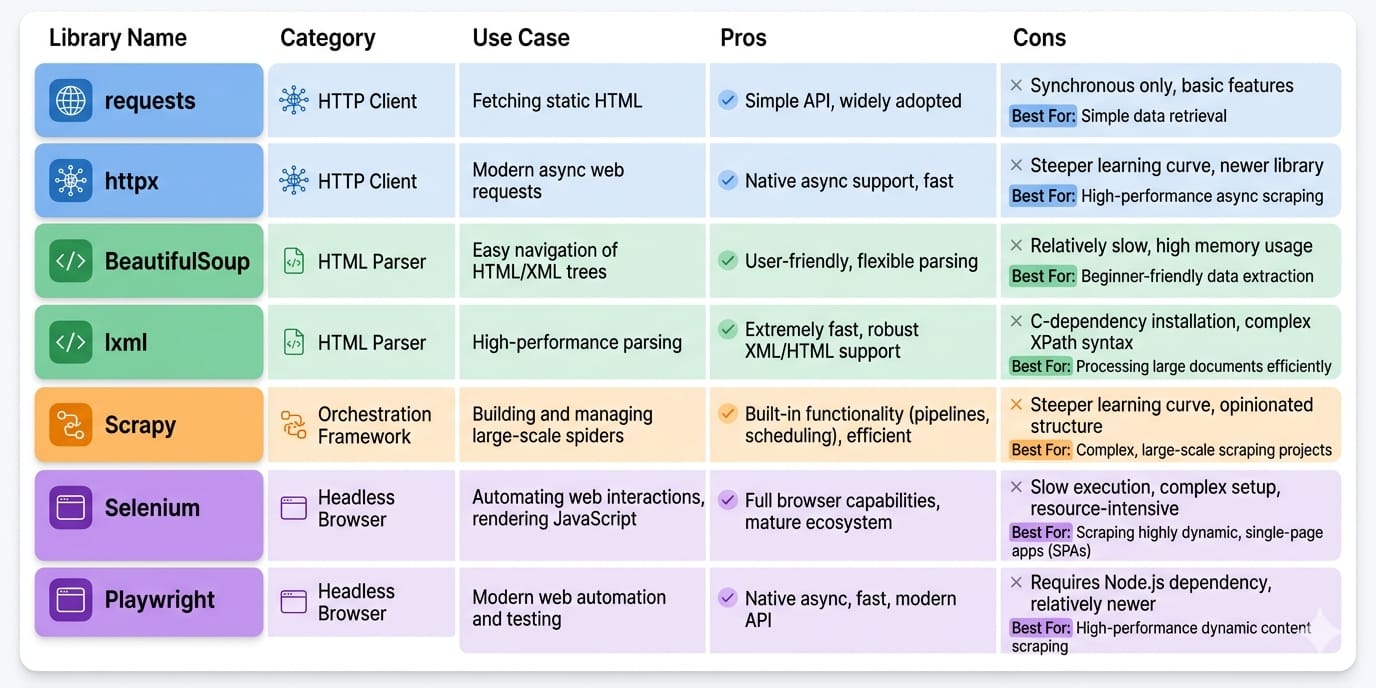
Python Scraping Libraries Comparison Matrix
High GitHub star counts do not guarantee production reliability. You must evaluate tools based on execution velocity, maintenance overhead, and scalability.
This matrix evaluates each tool across the operational constraints that dictate real-world success.
| Library | Primary Layer | Speed | JS Handling | Ease of Use | Scale | Anti-Bot | LLM-Ready |
|---|---|---|---|---|---|---|---|
| Requests | HTTP Client | High | None | High | Low | Low | Low |
| HTTPX | HTTP Client | High | None | High | Med | Low | Low |
| curl_cffi | HTTP Client | High | None | Med | Med | High | Low |
| BeautifulSoup | Parser | Low | None | High | Low | N/A | Low |
| lxml | Parser | High | None | Med | High | N/A | Low |
| selectolax | Parser | Very High | None | Med | High | N/A | Low |
| Scrapling | Parser | Med | None | High | Med | N/A | Low |
| Playwright | Browser | Low | Native | Med | Low | Med | Low |
| Selenium | Browser | Low | Native | Low | Low | Low | Low |
| Scrapy | Framework | High | Manual | Low | High | Low | Low |
| Crawlee | Framework | Med | Native | Med | High | High | Low |
| Crawl4AI | AI Extractor | Med | Native | High | Med | Med | High |
| ScrapeGraphAI | AI Extractor | Low | Native | High | Low | Med | High |
How to Choose the Right Python Scraping Stack
Base your architecture on target complexity, anti-bot aggression, scale, and output destination.
Step 1: Do you actually need to scrape?
Before writing code, verify data accessibility. Check for public APIs, embedded JSON-LD in the page source, RSS feeds, or hidden XHR/Fetch endpoints in your browser's network tab. Hitting an undocumented JSON API is always faster than parsing DOM nodes.
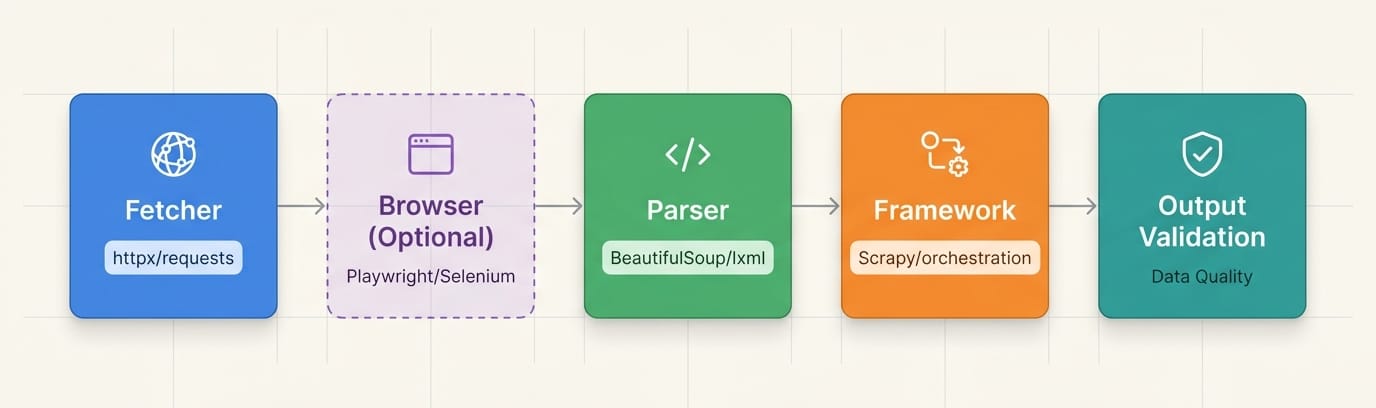
Libraries are layers, not substitutes
A production pipeline requires discrete components. Never treat a parser like a fetcher.
- HTTP client: Fetches the raw byte payload.
- Parser: Extracts specific nodes from the payload.
- Browser/runtime: Executes client-side JavaScript.
- Framework/orchestrator: Manages job queues, concurrency, and automated retries.
- Extraction layer: Transforms raw nodes into validated schemas (JSON/Markdown).
Python HTTP Clients for Scraping: Requests vs HTTPX vs curl_cffi
For new projects, bypassRequests. EvaluateHTTPXfor raw speed andcurl_cffifor avoiding basic IP/TLS blocks.
HTTP clients grab raw bytes from a server. They do not parse HTML, and they do not execute JavaScript.
Requests
- Primary Job: The baseline, synchronous
RequestsHTTP client. - Use when: Building simple, one-off scripts against unprotected, static sites.
- Avoid when: Requiring asynchronous execution or hitting strict bot protections.
- Scale limitation: Blocks the executing thread and lacks native HTTP/2 support, bottlenecking concurrent extraction.
HTTPX
- Primary Job: The modern, fully async default for HTTP fetching.
- Use when: Scraping large lists of predictable, static HTML pages (e.g., e-commerce catalogs) rapidly using
asyncio. - Avoid when: The target site renders its core content dynamically via JavaScript.
- Scale limitation: Uses standard TLS fingerprints. Advanced Web Application Firewalls (WAFs) easily flag it as an automated script.
curl_cffi
- Primary Job: The anti-bot HTTP client.
- Use when: Standard Python requests trigger 403 Forbidden errors or CAPTCHAs before returning HTML. It spoofs TLS/JA3 fingerprints to mimic legitimate browsers.
- Avoid when: The target data is generated by complex client-side JavaScript or WebSocket streams.
Python HTML Parsing Libraries: BeautifulSoup vs selectolax vs lxml
BeautifulSoup is perfect for learning. selectolax is mandatory for high-scale, cost-efficient parsing.Parsers convert HTML strings into traversable node trees.
BeautifulSoup
- Primary Job: An ergonomic, forgiving wrapper for DOM traversal.
- Use when: Prototyping rapidly or processing heavily malformed HTML. Pair it with the
lxmlbackend for baseline performance. - Scale limitation: CPU-heavy. A script parsing 10 pages perfectly will burn expensive compute time when processing 100,000 pages.
selectolax
- Primary Job: A hyper-fast HTML parser utilizing the Lexbor and Modest C engines.
- Use when: Parsing throughput is your primary infrastructure bottleneck. Benchmarks show
selectolaxparses HTML up to 30x faster than BeautifulSoup. - Scale limitation: Trades resilience for raw speed. It requires exact CSS selectors and struggles with severely unclosed HTML tags.
lxml
- Primary Job: A low-level, production-grade
lxmlworkhorse. - Use when: You rely heavily on precise XPath queries and require strict XML validation.
- Scale limitation: Highly rigid. Minor target redesigns break hardcoded XPaths instantly.
Scrapling
- Primary Job: An adaptive, resilience-first parsing library.
- Use when: DOM drift (frequent changes to class names or nested divs) constantly breaks your scripts. It finds elements adaptively rather than relying on exact paths.
Best Python Library for Scraping Dynamic Websites: Playwright vs Selenium
Playwright is the undisputed modern standard for JavaScript-heavy scraping. Default to it over Selenium.
When data lives inside React Single Page Applications (SPAs), infinite scrolls, or complex authentication flows, you must drive a real browser to execute client-side JavaScript.
Playwright
- Primary Job: Fast, reliable, async browser automation.
- Use when: Extracting any data requiring DOM rendering. Playwright offers native async support, isolated browser contexts, and auto-waiting to eliminate flaky
time.sleep()calls. - Scale limitation: Running hundreds of parallel Chromium contexts requires roughly 1-2GB of RAM per instance, scaling infrastructure costs linearly.
Selenium
- Primary Job: Legacy browser automation.
- Use when: Maintaining existing enterprise stacks or requiring specific legacy browser drivers.
- Avoid when: Starting a new scraping project. The synchronous API is noticeably slower and more resource-intensive than Playwright for concurrent tasks.
Python Scraping Frameworks for Large-Scale Crawling
Frameworks solve queue management, state, and retries. Use them when scraping 10,000+ pages.
A script executes linearly. A framework orchestrates.
Scrapy
- Primary Job: The battle-tested standard for asynchronous HTTP crawling.
- Use when: Executing massive, recurring, highly structured crawls across static HTML. It provides built-in data pipelines, proxy middleware, and robust rate-limiting.
- Scale limitation: Steep learning curve. Extending Scrapy to handle JavaScript targets (via Playwright middleware) adds significant operational complexity.
Crawlee for Python
- Primary Job: The modern, hybrid orchestrator.
- Use when: You need a single unified API to manage both fast HTTP requests and heavy headless browser crawling natively. It features out-of-the-box session management and proxy rotation.
- Scale limitation: Distributed scaling across server clusters still requires external queuing architecture (like Redis) and managed infrastructure.
AI-Native Python Scraping Tools: Crawl4AI vs ScrapeGraphAI
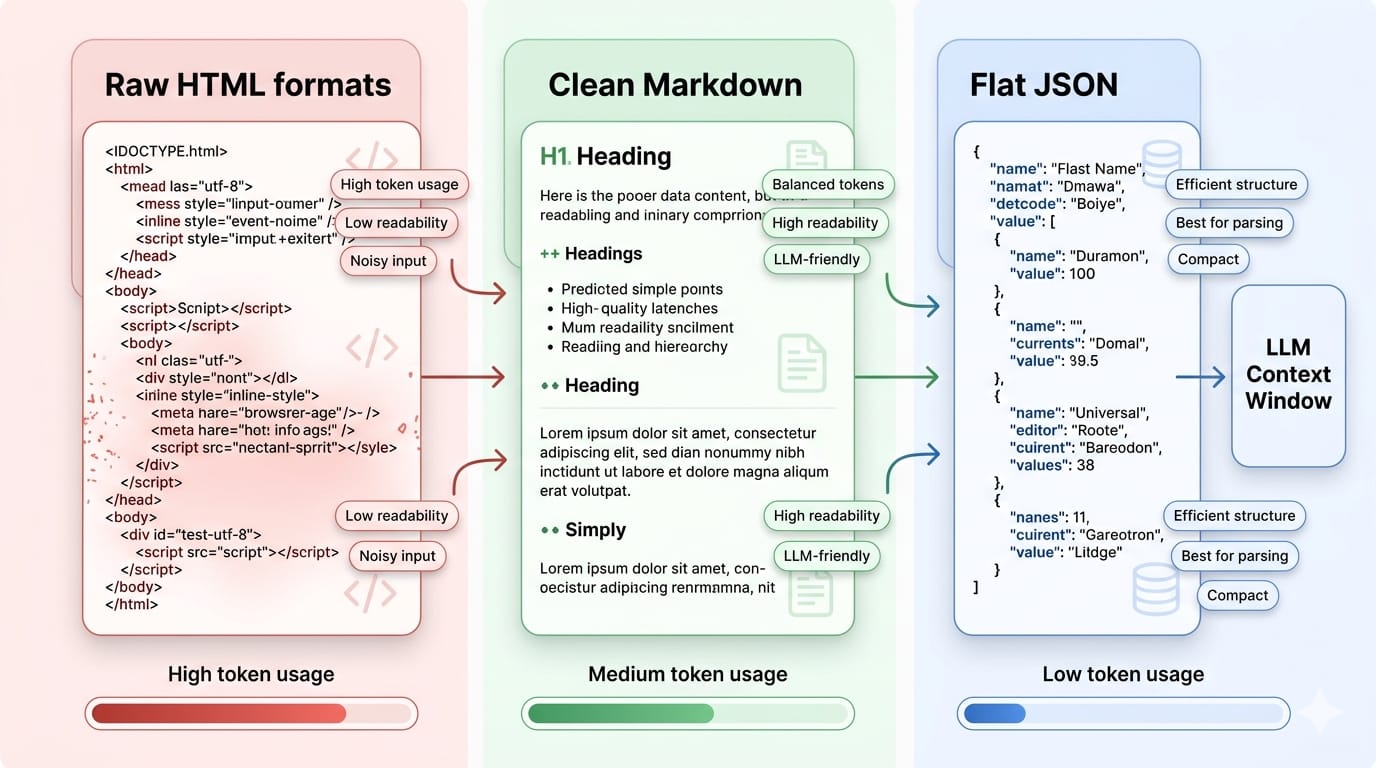
If your downstream consumer is a Large Language Model (LLM), structured output format matters more than the fetcher.
Feeding raw HTML nodes into an LLM context window wastes tokens, degrades extraction accuracy, and increases latency. The 2025 NEXT-EVAL benchmark established that feeding LLMs Flat JSON yields a superior extraction F1 score of 0.9567, drastically outperforming raw or slimmed HTML.
Crawl4AI
- Primary Job: The AI-ready extraction abstraction.
- Use when: You need token-efficient Markdown or structured JSON natively output from your crawl to feed a Retrieval-Augmented Generation (RAG) pipeline.
- Avoid when: You need fine-grained control over complex login flows, as its abstraction layer hides direct browser manipulation.
ScrapeGraphAI
- Primary Job: Schema-led, visual DOM extraction.
- Use when: Selector maintenance is too expensive. You define the target schema (e.g., "Extract product name and price"), and the LLM visually navigates the DOM to return structured data.
- Scale limitation: LLM inference costs per page load are far too slow and expensive for high-throughput, real-time scraping batches.
The Scraping Maturity Model: Scripts to Pipelines
The exact library you need changes as your workload moves from one-off extraction to recurring infrastructure.
1. Scripts (100+ pages)
- Characteristics: One-off extractions. Manual reruns are acceptable.
- Stack:
HTTPX+BeautifulSoup. - Failure Tolerance: High. Breakages are annoying but inexpensive.
2. Frameworks (10,000+ pages)
- Characteristics: Recurring crawls requiring queues, concurrency, and shared configurations.
- Stack:
ScrapyorCrawlee. - Failure Tolerance: Moderate. You expect blocks and require automated retry logic.
3. Pipelines (Daily high-volume schedules)
- Characteristics: Demands scheduling, strict proxy rotation, data validation via Pydantic, and alerting.
- Failure Tolerance: Zero. Downstream enterprise systems depend on stable data.
When to graduate: Upgrade your stack when URL counts exceed a single machine's compute capacity, or your team spends more hours fixing broken CSS selectors than writing new code.
Limitations of Python Scraping Libraries in Production
Libraries execute code. They do not remove the systemic cost of running scraping as a continuous operation.
- Anti-Bot Escalation: Success locally does not predict success in the cloud. Cloudflare and DataDome analyze TLS fingerprints, IP reputation, and canvas rendering. Basic Python HTTP clients trigger CAPTCHAs instantly.
- Infrastructure Overhead: Scaling a scraper means managing fleets of headless browsers, purchasing residential proxy pools, configuring message queues, and tuning memory limits to prevent out-of-memory (OOM) crashes.
- The Maintenance Treadmill: A/B tests and seasonal redesigns break your XPaths. This creates endless technical debt where engineers become full-time scraper mechanics.
- Data Poisoning: Web pages render inconsistently. Missing values and schema drift guarantee that unstructured HTML will eventually break your downstream relational database without rigorous validation.
Moving from Tool Selection to System Design
Eventually, maintaining scraping infrastructure costs more than the data itself. Transition to a managed pipeline.
When you execute thousands of URLs daily, you no longer have a library problem—you have a systems engineering problem.
Where Olostep Fits
Olostep sits above open-source libraries. It is not a replacement for a quick prototype; it is the operational layer for repeatable, high-scale web data workflows. Rather than manually stringing together Playwright, proxy rotators, and Pydantic validation, Olostep provides a unified API.
- Bypass Anti-Bot Natively: Handle dynamic rendering and CAPTCHAs via the Scrape API without managing JA3 fingerprints.
- Scale Concurrency: Process high-volume queues via the Batch Endpoint without tuning localized memory limits.
- Enforce Schemas: Transform unstructured DOMs into backend-ready JSON using Parsers.
- Feed AI Workflows: Pipe validated Markdown directly into LLMs via native LangChain integrations.
For engineering teams building competitive intelligence platforms or AI agents, shifting to a managed infrastructure layer permanently resolves localized scaling constraints.
Recommended Starting Stacks by Use Case
Pick the simplest stack that survives your target's refresh rate and page count.
- Indie Hacker / MVP:
HTTPX+BeautifulSoup(Lowest setup cost). - Growth Engineer / Monitoring:
Playwright+selectolax(Handles dynamic data with fast parsing). - Data Engineer / Pipeline:
Scrapy+lxml+Pydantic(Prioritizes rigorous exports and strict schemas). - AI Engineer / RAG:
Crawlee+Crawl4AI(Optimizes token usage and Markdown extraction).
FAQs
Which Python library is best for web scraping?
No single library wins every category. Your choice depends strictly on the target. Use BeautifulSoup for simple HTML parsing, HTTPX for fast asynchronous fetching, Playwright for rendering JavaScript, and Scrapy for massive recurring crawls.
Is Scrapy better than BeautifulSoup?
They do completely different jobs. Scrapy is a heavy orchestration framework that manages request queues, retries, and concurrency. BeautifulSoup is purely a parser that extracts data from HTML strings. You can actually use BeautifulSoup inside a Scrapy project.
Can Python scrape JavaScript websites?
Yes. To scrape dynamic single-page applications (SPAs) or infinite scrolls, you must use a headless browser automation library like Playwright or Selenium. These tools execute client-side JavaScript before you parse the DOM.
What is the fastest scraping library in Python?
Speed is divided into fetching and parsing. For fetching data, asynchronous clients like HTTPX dominate. For parsing the resulting HTML, selectolax is up to 30x faster than BeautifulSoup, as it utilizes optimized C engines under the hood.
Is Selenium good for scraping?
Selenium is functional and heavily utilized in legacy enterprise systems, but it is no longer the recommended default for new builds. Playwright has largely superseded it due to superior async support, built-in auto-waiting, and dramatically faster context management.
Final Recommendation: Choose the First Stack that Survives Your Scale
When evaluating the best Python web scraping libraries, start simple. Use HTTPX and BeautifulSoup to validate the data exists. Upgrade to Playwright when JavaScript blocks you. Move to Scrapy when volume overwhelms your machine.
If your scraper has already turned into an infrastructure burden, stop patching libraries. Transition your extraction layer into an API and pipeline problem via Olostep.