

You keep getting 403 Forbidden errors. You assume your headers are the problem, search for the best user agent for scraping, swap out your Python requests default for a fake Chrome string, and hit run.
You still get blocked.
Why? Because your perfect user agent was blocked before the server even read it. A user agent is not a magic key; it is merely a claim of identity. Scraping succeeds only when your entire browser fingerprint stack mathematically supports that claim.
Here is the truth about what actually works in modern anti-bot environments, and how to stop burning your requests on shallow fixes.
Quick Answer: What is the Best User Agent for Scraping?
The best user agent for scraping is a current, real-browser identity that matches the rest of your underlying network fingerprint.
- Standard scraping (low-to-moderate protection): Use a recent desktop Chrome user agent (e.g., Chrome 146) paired with matching
Sec-CH-UAClient Hints. - Mobile endpoints or mobile residential proxies: Use an iPhone Safari or Android Chrome user agent.
- Heavily protected sites (Cloudflare, DataDome): Raw user agents will fail. You must use a real browser or a browser-impersonating HTTP client that aligns your TLS and HTTP/2 fingerprints with your claimed user agent, especially when the target expects JavaScript execution.
Key Takeaway: Stop copying random strings from outdated lists. Use desktop Chrome by default. Use mobile only when your IP and session look mobile. Use a real browser when the target expects JavaScript execution.
What a User Agent Actually Means in Web Scraping
A user agent is the browser identity string sent in the HTTP request header. Websites use it to format content and execute initial bot screening.
Think of a user agent as the name on a security badge. Modern anti-bot systems do not just read the name. They inspect the badge hologram, the physical fingerprint of the person wearing it, and their movement patterns.
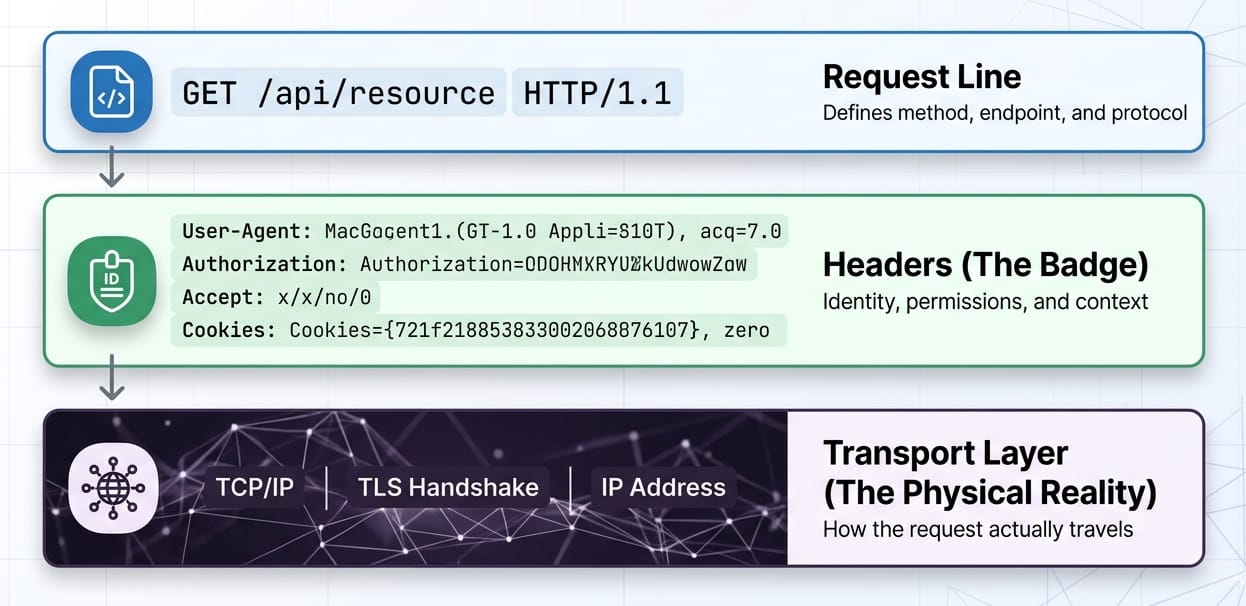
HTTP Request Anatomy:
- Request Line:
GET /target-page HTTP/2 - Headers:
User-Agent: Mozilla/5.0...(The badge) - Client Hints:
Sec-CH-UA: "Chromium";v="146"...(The supporting ID) - Transport Layer: TLS fingerprint, TCP window size (The physical reality)
Browsers no longer stuff granular device details into the user-agent string. They expose structured data via User-Agent Client Hints. Spoofing an old string without proper hints is highly detectable.
Which User-Agent Strings to Use (And Avoid)
Why Default Libraries Get Blocked
Default library headers scream "bot." Common failure culprits include:
python-requests/2.31.0Scrapy/2.11.0 (+https://scrapy.org)HeadlessChrome/146.0.0.0(The word "Headless" triggers instant bans).
When developers hit a block, they swap the string. The server still infers the truth from the underlying network layers. If you claim to be Chrome but your TLS signature is OpenSSL (typical of default Python), your request is burned.
A Short Browser User Agents List to Model
Warning: This browser user agents list only works if your Client Hints, header order, and TLS profile match the claim.
1. Desktop Chrome (Safest Default)
Mozilla/5.0 (Windows NT 10.0; Win64; x64) AppleWebKit/537.36 (KHTML, like Gecko) Chrome/146.0.0.0 Safari/537.36- Best Use: Standard desktop scraping.
- Risk: Highly scrutinized. Mismatched Client Hints immediately flag the request.
2. iPhone Safari (Mobile Emulation)
Mozilla/5.0 (iPhone; CPU iPhone OS 18_6 like Mac OS X) AppleWebKit/605.1.15 (KHTML, like Gecko) Version/26.0 Mobile/15E148 Safari/604.1- Best Use: Mobile-specific workflows or residential mobile proxies.
- Risk: Sending this from a known datacenter IP with desktop HTTP/2 frames is a dead giveaway.
3. Android Chrome
Mozilla/5.0 (Linux; Android 10; K) AppleWebKit/537.36 (KHTML, like Gecko) Chrome/146.0.0.0 Mobile Safari/537.36- Best Use: Emulating Android app traffic.
- Risk: Requires exact matching of
Sec-CH-UA-Mobile: ?1.
TL;DR: Update your strings monthly. Sync them with current stable browser releases.
Rotate User Agent Scraping: Stop Doing It Wrong
Should you rotate user agents for scraping? Yes. But per-request random rotation is a fatal mistake.
Randomly changing your user agent string on every single request while maintaining the same IP address or session cookie triggers anomaly detection. Real human browsers do not upgrade from Chrome 145 to Chrome 146 between page loads. Anti-bot systems monitor site-specific anomalies and punish erratic identity shifts.
| Approach | Best For | Failure Mode |
|---|---|---|
| Static current UA | Stable low-protection scraping. | Lacks diversity for massive volumetric scrapes. |
| Random per-request rotation | Very basic, stateless targets. | Incoherent identities; triggers session anomaly flags. |
| Session-level rotation | Production data pipelines. | High implementation complexity. |
Why User Agents Alone Are Not Enough
User agents sit in the middle of a massive trust stack. Changing the string is a shallow fix. Cloudflare synthesizes traffic globally and relies on inter-request signals and unique JA4 fingerprints to block spoofed identities. The user agent string is just one tiny variable in a massive classification system.
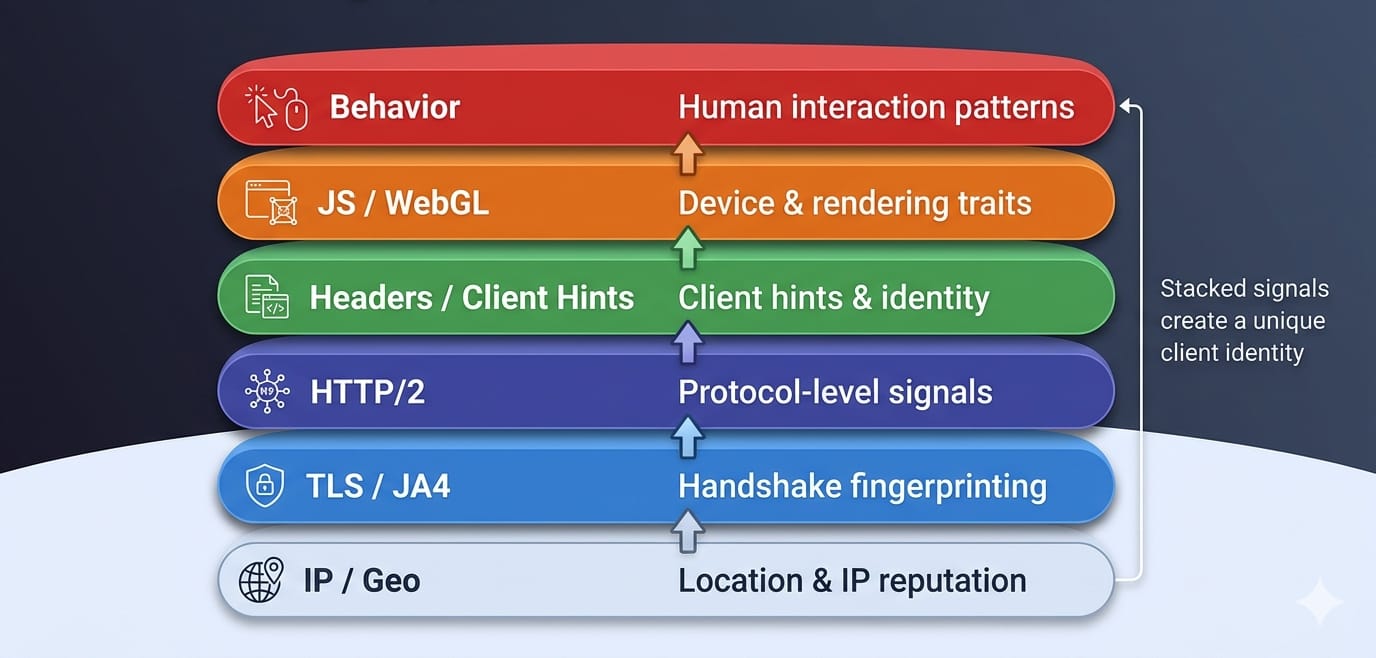
The Fingerprint Stack
- IP, ASN, and Geo: Sending a French mobile user agent from an AWS datacenter in Virginia burns the request instantly.
- TLS Fingerprint (JA4): Before headers are read, the client establishes a secure connection. Anti-bot systems cross-reference the cryptographic JA4 fingerprint against the claimed user agent.
- HTTP/2 Fingerprint & Header Order: Browsers send headers in a strict, predictable order. Python
requestsorders them differently than Chrome. - JavaScript & WebGL: Once the page loads, JavaScript checks
navigator.userAgentand tests rendering to verify the client.
The Client Hints Shift
Browsers actively reduce the granularity of the user-agent string. Precise OS versions and device models are now housed in User-Agent Client Hints (Sec-CH-UA, Sec-CH-UA-Mobile, Sec-CH-UA-Platform).
Research presented at the ACM WPES conference confirms that trackers and anti-bot systems actively extract high-entropy Client Hints for identification. Old lists of fake user agent strings are entirely useless if you fail to construct the accompanying hint headers.
Key Takeaway: If you use a fake Chrome user agent generated by a Python library, but leave the TLS fingerprint as OpenSSL, your identity is incoherent. You will be blocked.
How Modern Anti-Bot Systems Detect Scrapers
Cloudflare, DataDome, and HUMAN track behavior across millions of sites. Detection is increasingly per-site, reliant on machine learning models evaluating anomalies rather than static blocklists.
Soft Blocks and Silent Poisoning
A 200 OK status code does not mean you succeeded. Modern anti-bot systems deploy silent failures:
- Serving degraded or altered content.
- Injecting challenge pages masquerading as normal responses.
- Deploying decoy content via AI-generated honeypots.
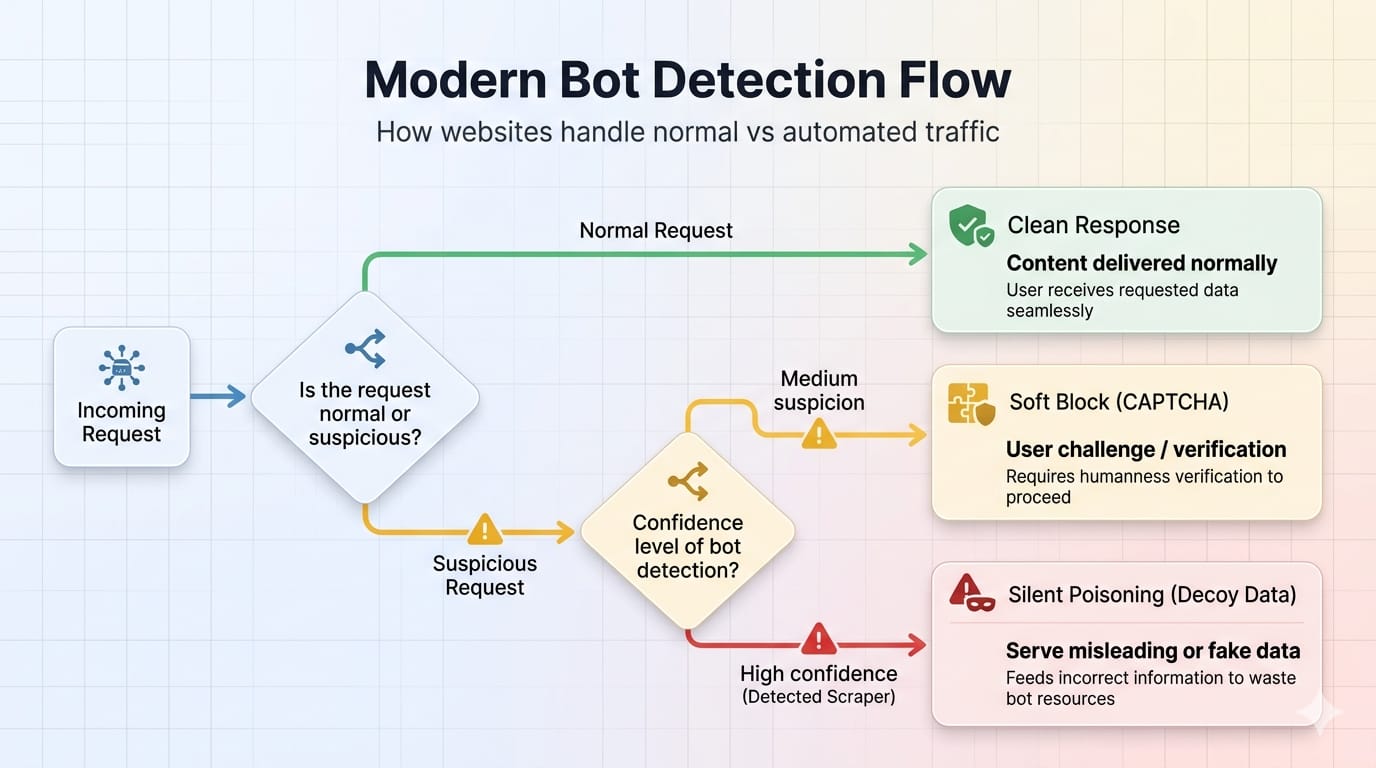
User Agent Scraping in Python: Practical Patterns
Minimal Pattern (Weak Targets Only)
Note: This is not a stealth strategy. It works only on unprotected sites.
import requestsheaders = { "User-Agent": "Mozilla/5.0 (Windows NT 10.0; Win64; x64) AppleWebKit/537.36 (KHTML, like Gecko) Chrome/146.0.0.0 Safari/537.36", "Accept": "text/html,application/xhtml+xml,application/xml;q=0.9,image/avif,image/webp,*/*;q=0.8", "Accept-Language": "en-US,en;q=0.5", "Sec-CH-UA": '"Chromium";v="146", "Not(A:Brand";v="24", "Google Chrome";v="146"', "Sec-CH-UA-Mobile": "?0", "Sec-CH-UA-Platform": '"Windows"'}response = requests.get("https://example.com", headers=headers)Why Fake User Agent Python Libraries Fail
Packages generating "fake user agent python" data generate text strings, not coherent identities. They do not fix TLS discrepancies, format HTTP/2 frame data, or pass JavaScript fingerprinting checks.
When you encounter moderate protection—where headers look perfect, but you still get 403 errors—escalate to a browser-impersonating client. For JS-heavy pages, move to real browsers.
When to Stop Tuning Headers and Use a System
Manual scraping works for simple projects. Scaling it means absorbing severe technical debt. You end up maintaining header bundles, Client Hints logic, proxy rotation, JS rendering farms, and honeypot detection.
If you care more about reliable structured output than hand-tuning every fingerprint layer, rely on a system-layer abstraction. Olostep manages the full request environment so you can focus on data.
/scrapesextracts a URL to clean Markdown, HTML, or JSON./parsersdelivers backend-ready JSON for known page types./agentsruns scheduled, multi-step research workflows.
Stop asking "Which user agent should I use?" Ask "How do I get reliable structured data at scale?" Explore Olostep's Welcome and Scrapes docs.
Frequently Asked Questions (FAQ)
What is a user agent in web scraping?
It is a browser identity string sent in HTTP request headers. Websites use it to adapt content delivery and execute initial bot screening.
Should I rotate user agents for scraping?
Yes, but rotate complete session identities. Bind the user agent, IP, headers, and cookies together. Rotate between full sessions, never mid-session.
Can websites detect fake user agents?
Absolutely. Websites cross-reference the claimed user agent against your IP reputation, HTTP/2 constraints, Client Hints, and TLS fingerprints. Discrepancies expose fakes instantly.
Is a user agent enough to avoid blocking?
No. A valid user agent is necessary for basic plausibility but completely insufficient for protected targets. Modern blocking relies on network protocol anomalies.
Bottom Line
Your best default is a current desktop Chrome user agent matched perfectly to Chrome-like headers and Client Hints. Rotate full session identities, never just the raw string. A fake string fails if the underlying network fingerprint contradicts it.
Choose the identity your stack can actually support. If you want to bypass these headaches entirely and build reliable data pipelines, abstract the problem away. Explore Olostep's Welcome page to move from header-level tricks to enterprise-grade web data collection.