

Stop looking for a magical all-in-one scraper. The reality of data extraction in 2026 is brutal: automated bots now generate nearly 50% of all internet traffic [4], defenses are escalating, and the best web scraping tools are no longer single scripts—they are specialized infrastructure stacks.
Whether you are feeding a high-volume Postgres database or a low-latency AI agent, you must match your tool to your target output, scale, and compliance risk. The market has permanently split into two distinct lanes: traditional tools for raw HTML pipelines, and AI-native APIs that deliver clean Markdown and structured JSON.
If you already know you need structured JSON at scale, skip the DIY headache and explore Olostep’s Batch Endpoint. If you are building from scratch, use the decision framework below to match your workflow to the right stack.
What are the best web scraping tools?
There is no single best tool; the right choice depends on your technical expertise and target output. Python developers prefer Scrapy for high-volume crawling, AI engineers use Firecrawl for Markdown extraction, and data platform teams rely on Olostep for scalable, structured JSON workflows. Non-technical users often start with Octoparse for no-code extraction, while enterprise teams use Bright Data to bypass heavily protected domains.
Which web scraping tool is easiest to use?
Octoparse is the easiest true no-code tool for non-technical users extracting data from simple, static pages. However, visual no-code tools frequently break when targeting protected or JavaScript-heavy websites.
What is the best web scraping API?
Use Olostep for structured JSON and massive batch scale. Choose Firecrawl for Markdown-first AI workflows. Use Bright Data for enterprise-grade network access. Select ZenRows, ScrapingBee, or ScraperAPI for simpler, developer-first bypass implementations.
What tools are used for scraping websites?
Modern extraction relies on specific categories rather than single brands. Teams use parser libraries (BeautifulSoup), crawler frameworks (Scrapy), headless browsers (Playwright), managed APIs (ZenRows), AI-native APIs (Olostep), and no-code platforms (Octoparse) depending on the exact pipeline layer they need to solve.
Best web scraping tools at a glance
If two tools still look similar, go to the decision framework next. That is where the real differences show up.
| Tool | Type | Best for | Use when | Output | Scale fit | Main limitation |
|---|---|---|---|---|---|---|
| Requests + BeautifulSoup | Parser library | Beginners | Extracting specific fields from static HTML | HTML / Text | Low | No rendering, no crawler features. |
| Scrapy | Crawler framework | Data engineers | Running deterministic, high-volume crawling | JSON / CSV / XML | High | Requires separate anti-bot and rendering. |
| Playwright | Browser automation | Developers | Interacting with dynamic SPAs and logins | DOM / HTML | Medium | Expensive infrastructure; you own proxy management. |
| Olostep | AI-native API | AI & Platform teams | Running batch processing and structured extraction | Structured JSON / Markdown | High | API-first workflow; overkill for a single simple script. |
| ZenRows | Managed API | Developers | Bypassing CAPTCHAs and anti-bot systems | HTML / JSON | Medium | Less composable for highly customized orchestration. |
| ScrapingBee | Managed API | Small dev teams | Avoiding DIY browser fleet management | HTML / JSON | Medium | Not built for extreme-scale enterprise crawling. |
| ScraperAPI | Managed API | Developers | Needing fast access or structured endpoints | HTML / JSON | Medium | Credit-based pricing hides true cost on complex sites. |
| Bright Data | Enterprise API | Platform teams | Unlocking heavily protected enterprise targets | Raw Data / JSON | High | Expensive and overbuilt for simple workloads. |
| Crawl4AI | Open-source AI | AI engineers | Self-hosting RAG ingestion pipelines | Markdown / JSON | Medium | You still manage proxies, sessions, and breakage. |
| Firecrawl | Managed AI API | AI teams | Powering chat-with-site agent workflows | Markdown / JSON | Medium | High compute costs on complex JSON mode extraction. |
| Apify | Hybrid platform | Growth ops | Using prebuilt actors and cloud scheduling | JSON / CSV | Medium | Actor quality varies across the marketplace. |
| Octoparse | No-code software | Marketers | Point-and-click recurring extraction | CSV / Excel | Low | Brittle on protected, dynamic, or scale-heavy tasks. |
How to choose the right web scraping stack
Start with the output, map the pipeline, price the maintenance, then check compliance. That sequence prevents the most common mistake in this category: choosing a tool based on feature lists before understanding your actual workflow.
Start with where the data goes
Database, BI, and recurring analytics
If your destination is a Postgres database or BI dashboard, you require structured JSON or CSV-first tools. Deterministic parser-based extraction beats probabilistic LLM extraction here for speed and reliability.
RAG, AI agents, and LLM context
If you are feeding an LLM, use Markdown/JSON-first tools. Clean Markdown radically reduces RAG token usage. Raw HTML is the wrong default format for AI models due to massive DOM noise.
Spreadsheets, alerts, and ops workflows
If your destination is a spreadsheet or a Slack alert, prioritize tools with native APIs, Webhooks, or native n8n/Zapier connectors.
Map the stack to the pipeline
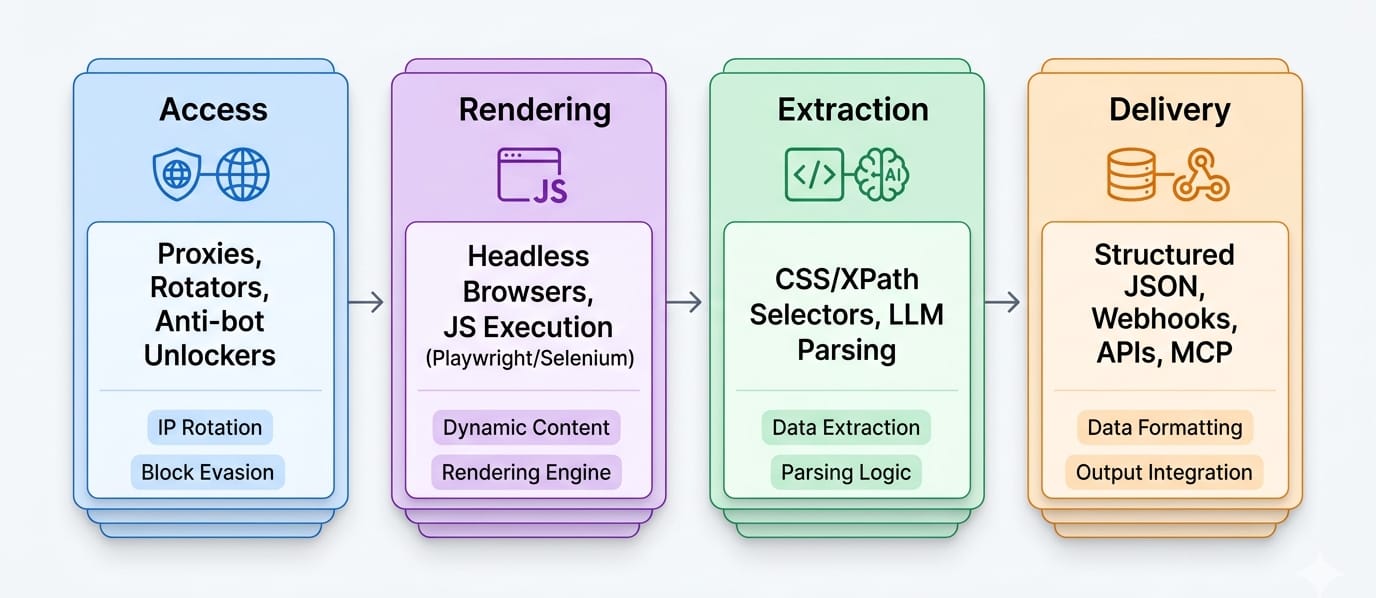
Understand the difference between web scraping vs web crawling. Scraping is a multi-layer pipeline:
- Access layer: Proxies, anti-bot unlockers, and geo-targeting.
- Rendering layer: Browser execution, JS execution, login flows, and SPA handling.
- Extraction layer: CSS/XPath selectors, LLM extraction, or schema-based JSON parsers.
- Delivery layer: API responses, webhooks, batch scheduling, and MCP surfaces.
Check site difficulty before you pick a vendor
- Static pages: Cheap to scrape. Simple HTTP requests work.
- JavaScript-heavy pages: Require headless browser execution. Costs jump exponentially.
- Login/session-dependent pages: Require persistent browser contexts.
- Protected targets: Cloudflare or DataDome friction require dedicated web unlocker APIs.
The shortlist: detailed reviews of the tools worth evaluating
Many older listicles still recommend discontinued, legacy Windows-only, or fundamentally outdated tools like ParseHub, Portia, or Dexi.io. Ensure any tool you evaluate has active 2026 documentation and modern API support.
Open-source scraping frameworks and web crawler tools
Requests + BeautifulSoup
Positioning: A parser-based starter stack for simple, known HTML pages.
Best for: Developers extracting targeted fields from static sites.
Use when: You already know the specific URLs, the HTML is stable, and JavaScript rendering is unnecessary.
Main limitation: This is a parser library, not a crawler. It lacks a rendering engine, and parser choice drastically alters parse trees, causing brittle extraction. You must build your own infrastructure to handle volume.
Scrapy
Positioning: The default deterministic open-source crawling framework for repeatable, high-volume pipelines.
Best for: Data engineers and Python teams who demand total pipeline control.
Use when: You need custom spiders, CSS/XPath selectors, feed exports, robust middleware, and sitemap-aware crawling capabilities.
Main limitation: Rendering dynamic JavaScript and bypassing anti-bot systems remain entirely separate engineering problems you must solve yourself. Scrapy is a crawler framework, not a managed web unlocker.
Playwright
Positioning: The default modern browser automation layer for dynamic websites.
Best for: Developers scraping Single Page Applications (SPAs), complex login flows, and interaction-heavy pages.
Use when: You absolutely require visual rendering, exact click simulations, dynamic waits, and granular browser state control.
Main limitation: Browser automation is highly resource-intensive and expensive at scale. Playwright is a library, not a managed service; you own proxy rotation, infrastructure compute costs, and detection risk.
API-based web scraping tools
Olostep
Positioning: The premier web scraping API for scalable, structured extraction.
Best for: AI teams, data platform engineers, and growth operators running recurring extraction across thousands of URLs.
Use when: You need high-volume /batches, deterministic /parsers, LLM-friendly outputs (JSON, Markdown), and seamless workflow integrations. Olostep natively exposes scrapes, crawls, maps, and agents. It bridges the gap between massive scale and clean data via documented paths for LangChain, MCP, n8n, and Zapier.
Main limitation: Its API-first workflow makes it overkill for a non-technical hobbyist scraping a single static site.
- Review Olostep Pricing
- Explore the Batch Endpoint docs
- Understand how to use Parsers
- Connect the MCP Server
ZenRows
Positioning: The fastest path for developers who need anti-bot handling without building their own unlocker stack.
Best for: Extracting data from protected targets quickly.
Use when: JavaScript rendering, residential proxies, CAPTCHA auto-solving, and Cloudflare bypass matter significantly more than deep pipeline control.
Main limitation: ZenRows utilizes a pay-per-success model. While highly effective for access, it is less composable than a custom stack when downstream extraction workflows get highly specialized.
ScrapingBee
Positioning: The simplest managed rendering and proxy API for small engineering teams.
Best for: Prototypes, marketing ops, and mid-scale automation workflows requiring browser interaction.
Use when: You need to execute JavaScript scenarios, rotate proxies, enforce strict geotargeting, or apply lightweight CSS extraction rules without managing the browser instances yourself.
Main limitation: Less suited to extreme-scale enterprise crawling or deep AI-agent integration compared to modern specialized platforms.
ScraperAPI
Positioning: The easiest structured-endpoint API when speed of rollout matters more than maximal granular control.
Best for: Developers who want fast async access coupled with prebuilt structured endpoints.
Use when: You need immediate access to Google, Amazon, or Walmart structured data without managing infrastructure.
Main limitation: Credit-based pricing models can obscure the true operating cost on heavily rendered pages. Fast raw HTML retrieval does not eliminate your downstream parsing burden.
Bright Data
Positioning: The ultimate enterprise-grade access layer for heavily protected targets.
Best for: Platform teams, enterprise data collection, and organizations that demand unlockers, datasets, and strict compliance messaging from a single vendor.
Use when: The absolute hardest part of your pipeline is network access and proxy routing.
Main limitation: Exceptionally expensive, highly complex to configure, and massively overbuilt for beginners doing straightforward extraction.
AI web scraping tools
Crawl4AI
Positioning: The best open-source AI-native crawler for self-hosted Markdown and JSON extraction.
Best for: AI engineers who demand local control and RAG-friendly outputs.
Use when: You want to own your extraction stack and feed internal LLM systems without relying on SaaS vendor lock-in.
Main limitation: Self-hosting means you entirely manage your own headless browsers, proxies, session states, and site breakage. It removes software cost but increases engineering maintenance.
Firecrawl
Positioning: The best managed AI-native scraper for fast LLM-ready extraction.
Best for: Development teams building active agents or Markdown-first ingestion pipelines.
Use when: You want clean Markdown, dynamic actions, batching, and MCP connectivity working out of the box without managing infrastructure.
Main limitation: Credit-based usage costs escalate rapidly. Using specialized JSON mode extraction or advanced rendering options significantly multiplies the credit cost per request.
Hybrid workflow and no-code tools
Apify
Positioning: The best hybrid platform when you require reusable automations, robust scheduling, and ecosystem leverage.
Best for: Mixed-skill teams, SEO professionals, and organizations wanting prebuilt "Actors" alongside API control.
Use when: You need to run containerized code in the cloud, require standard JSON outputs, and want integrated scheduling and monitoring out of the box.
Main limitation: Apify is a platform choice, not just a single scraper. Code quality and operational ergonomics vary wildly depending on which third-party Actor you select from their marketplace.
Octoparse
Positioning: The best true no-code web scraping software for non-technical operators.
Best for: Beginners, marketing ops, spreadsheet-driven workflows, and simple recurring data pulls.
Use when: You need intuitive point-and-click setup, prebuilt templates, and simple cloud-based execution.
Main limitation: No-code breaks quickly. Visual selectors are highly brittle on JavaScript-heavy SPAs or aggressively protected domains. Do not push it past its intended lane.
Best web scraping tools by user type and workload
Pick by workload, not by hype: developers need control, beginners need ease, AI teams need clean outputs, and data teams need reliability. The same tool rarely wins all four.
Best web scraping tools for developers
Do not pick a tool; pick a stack. For static pages, use Requests + BeautifulSoup. For deterministic batch crawling, use Scrapy. For dynamic rendering, use Playwright. When anti-bot systems block you, use ZenRows as a managed fallback. If you need clean JSON scale instantly, integrate Olostep.
Best web scraping tools for beginners
Start with Octoparse for zero-code, visual extraction. If you need slightly more power but still want templates, use Apify.
Guardrail: If a site requires login, heavy JS interaction, or blocks your IP, move to a managed API. No-code tools struggle heavily against modern defenses.
Best tools for scraping dynamic websites
Dynamic sites are a rendering problem first, and an extraction problem second.
- Playwright (if you want to own the browser infra)
- ScrapingBee / ZenRows (for managed headless rendering)
- Firecrawl (if you just need AI-native actions on the page)
Best web scraping API for scalable, structured extraction
- Olostep: Best for structured JSON, recurring batch workloads, and parser-driven pipelines.
- Bright Data: Best for enterprise-grade protected targets at massive scale.
- ScraperAPI: Best for fast structured endpoint deployment.
Best AI web scraping tools for RAG, LangChain, and agents
- Firecrawl: Best for Markdown-first context ingestion.
- Crawl4AI: Best for self-hosted, open-source RAG pipelines.
- Olostep: Best for LangChain integrations and schema-first JSON extraction.
Best tools for SEO teams, competitor tracking, and lead gen
Operators should use Apify or Octoparse for one-off workflows. For deep competitive intelligence, SERP tracking, and scheduled lead enrichment, use Olostep to automate structured data extraction directly into your CRM or database.
Real cost: pricing, TCO, and maintenance burden
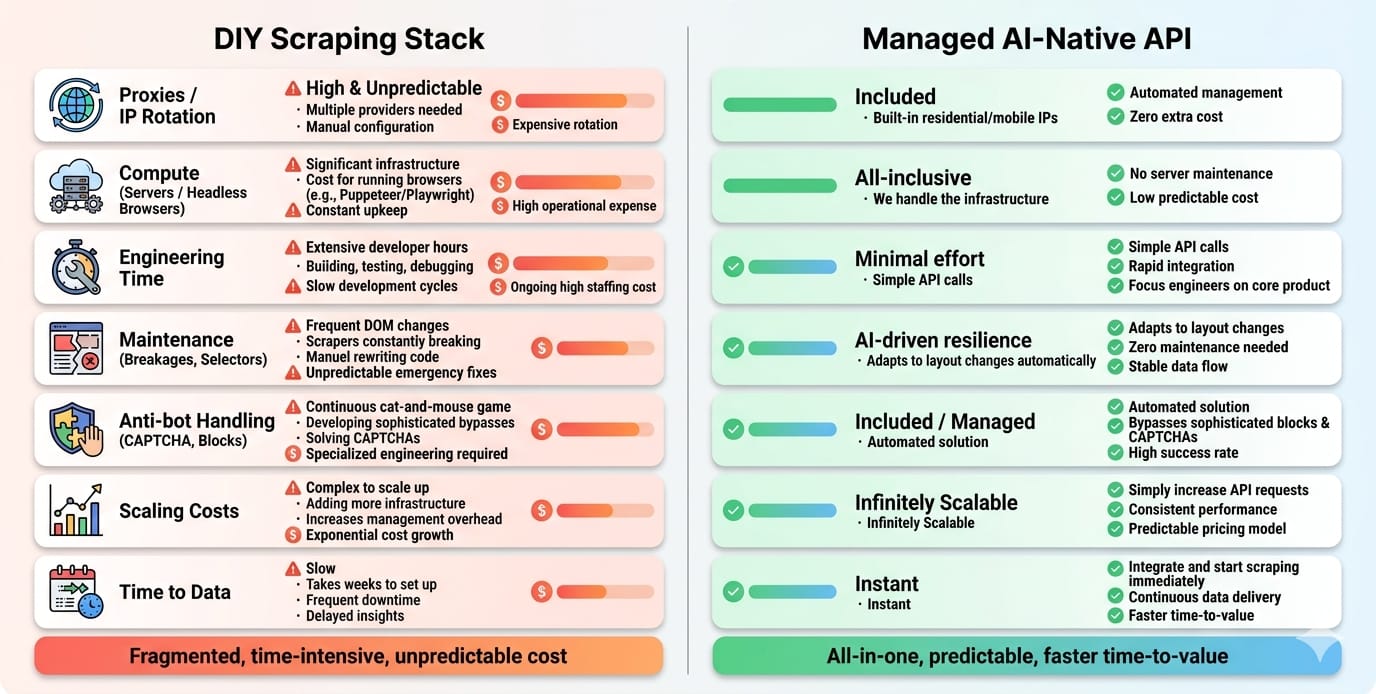
The expensive tool is often the one you maintain yourself. Compare page/request pricing, JS/rendering surcharges, failed requests, proxies, browser infra, and weekly break-fix time.
What to compare beyond the plan page
Never judge a tool by its basic monthly tier. You must factor in:
- Request vs. Credit vs. Compute pricing.
- JavaScript rendering surcharges (often 5x to 25x standard cost).
- Billing for failed requests or retries.
- Proxy consumption.
- Human maintenance hours for fixing broken selectors.
Month 1 vs Month 12
Setup is visible; maintenance is hidden. In Month 1, an open-source tool looks free. By Month 12, schema drift, proxy bans, and anti-bot updates will consume a massive percentage of an engineer's time. UI layout changes break the majority of traditional parser-based scrapers without proactive schema maintenance. Choose tools that absorb maintenance drift for you.
Why “free” tools get expensive
BeautifulSoup is free. The CAPTCHA solvers, rotating residential proxies, cloud-hosted browser fleets, and dedicated engineering hours required to keep it running are not. Opportunity cost is the silent killer in web data extraction.
Is web scraping legal? The 2026 compliance filter
Scraping public, non-personal data carries fundamentally different risk than scraping gated, personal, or copyrighted material. Risk rises fast when you add PII, bypass authentication, or run AI-training-scale collection. (Informative only, not legal advice).
The practical risk test
- Is the data public? Public business directories carry fundamentally different risk than scraping private internal dashboards.
- Is it personal data? Scraping Personally Identifiable Information (PII) triggers GDPR, CCPA, and strict regulatory frameworks.
- Is it behind technical controls? Bypassing login screens or agreeing to explicit Terms of Service creates direct breach-of-contract risk.
- Are you reusing copyrighted content? Dozens of ongoing copyright lawsuits tied to AI scraping make enterprise compliance mandatory.
When not to scrape
Do not scrape if an official API or licensed dataset solves the problem better. Do not scrape if the business risk of scraping a gated competitor outweighs the value of the data. Modern tools must support your compliance posture through clear audit trails, source URL lineage, and robots.txt adherence.
AI-native scraping: Markdown, JSON, and WebMCP
If your output feeds an LLM, format matters as much as access. Markdown-first tools reduce cleanup for RAG, JSON-first tools improve structured automation, and MCP-ready tools shorten the path from model to live web data.
Why output format dictates tool choice
- Markdown for RAG: Clean Markdown removes DOM noise, dramatically cutting LLM token usage and hallucination rates.
- JSON for structured automation: Schema-based JSON is required for deterministic database routing and API payloads.
- HTML for raw control: Raw HTML is necessary for exact visual archival, but it is the wrong terminal format for AI agents due to massive token bloat.
WebMCP: what it changes and what it does not
Web Model Context Protocol (WebMCP) is an emerging W3C browser-native protocol designed to expose structured tools directly to AI agents [14]. Instead of forcing agents to take screenshots or guess where UI buttons are located, WebMCP allows websites to declare explicitly structured tool contracts.
This protocol has been shown in early benchmarks to improve token efficiency by 89% compared to traditional visual scraping approaches [6], [14].
While WebMCP is a vital framework for future-proofing agent interactions on supported sites, it does not replace high-volume batch scraping pipelines today. For predictable scale across 100,000 pages, high-volume parser-based extraction remains the operational standard.
Final recommendation: which tool should you pick?
Pick the tightest tool that solves your real problem. Move up the stack only when the workflow forces you to.
- If you are doing simple static-page extraction: Use Requests + BeautifulSoup.
- If you need deterministic crawling and full control: Build on Scrapy.
- If you need browser control for dynamic sites: Start with Playwright, then migrate to ZenRows or ScrapingBee when anti-bot pain appears.
- If you need LLM-ready output fast: Plug in Firecrawl (or Crawl4AI for self-hosting).
- If you need structured JSON and recurring scale: Integrate Olostep. It is the optimal fit for data and AI teams that demand repeatable, automation-ready batch extraction without massive post-processing overhead.
- If you are handling enterprise-grade protected targets: Pay the premium for Bright Data.
- If you need no-code: Use Octoparse, but keep it strictly inside its lane.
Next Steps
- Still comparing categories? Revisit the pipeline diagram above.
- If your workload is batch-heavy and JSON-first, explore Olostep’s Batch Endpoint and Parsers docs.
- If you need to validate cost, check the Olostep pricing page.
- If your use case is 200k+ pages/month, protected targets, or AI-agent workflows, talk to a specialized vendor team for a scoped recommendation.