

If your first instinct when scraping dynamic websites with Python is to launch headless Chromium, you are starting too late.
Yes, 94% of modern websites rely on client-side rendering. But rendering is just a presentation layer. The secret to efficient extraction is skipping the DOM entirely and intercepting the underlying data. You do not always need heavy browser automation.
Early in my career, I spent three days building brittle browser scripts to scrape a dynamic real-estate dashboard. It "worked," but required 800MB of RAM per worker. A week later, I checked the page source and found the exact JSON payload sitting perfectly formatted inside a <script id="__NEXT_DATA__"> tag. I deleted 200 lines of browser automation and replaced it with a 10-line HTTP request.
By targeting hidden APIs, embedded JSON, or using curl-impersonation, you can extract data faster, cheaper, and without getting blocked. This guide covers what to try first, how to handle JavaScript-rendered content, when Playwright beats Selenium, and how to conquer AJAX, infinite scroll, and anti-bot friction without managing a massive browser fleet yourself.
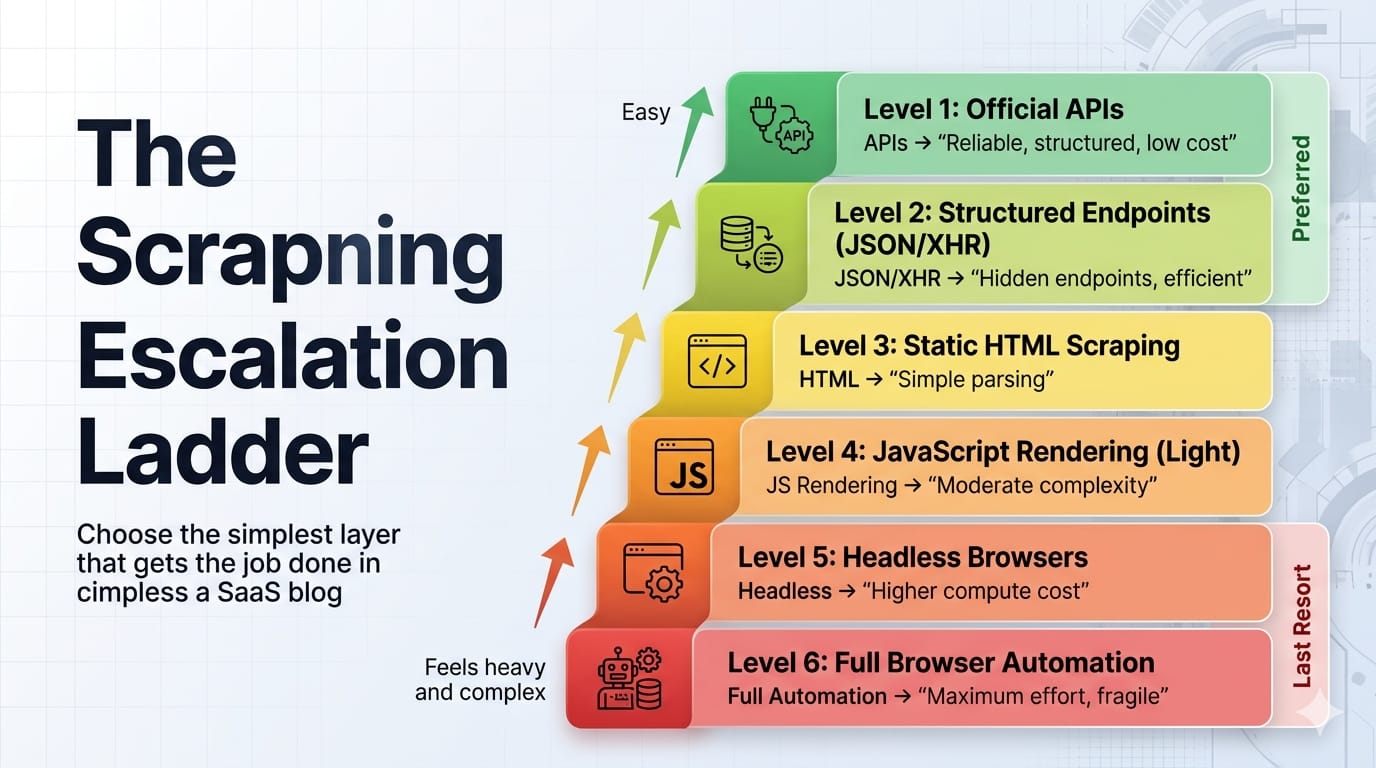
Can Python scrape dynamic websites?
Yes, Python handles dynamic web scraping seamlessly. While traditional HTML parsers like BeautifulSoup fail on JavaScript-rendered content, Python developers extract dynamic data by intercepting hidden XHR/AJAX requests, parsing embedded hydration JSON, using modern browser automation (Playwright/Selenium), or leveraging managed scraping APIs.
While the 94% client-side rendering statistic accurately reflects modern web development, it obscures a structural truth: the DOM is often the most expensive place to extract data from. BeautifulSoup remains highly relevant, but only after you acquire the correct HTML or JSON. To scrape efficiently, you must choose the lightest layer that exposes the underlying data.
How to scrape JavaScript-rendered content in Python
Start with the data source, not the rendered DOM. Dynamic scraping is a data-path selection problem. Escalate to heavier tools only when lighter layers fail.
Follow this escalation ladder to minimize infrastructure costs and maximize reliability:
1. Check for an official API first
Look for public REST endpoints, documented partner APIs, or structured feeds. Official APIs offer strict data contracts, native pagination, and zero rendering overhead.
2. Find the hidden API: XHR, Fetch, or GraphQL
Most dynamic pages are just data combined with a rendering engine. If the user's browser fetches JSON to populate a grid, your Python script can fetch that exact same JSON. This should be your default path.
3. Parse embedded JSON or hydration state
Modern single-page applications (React, Vue, Next.js) often serialize their initial state directly into the HTML within <script> tags, hydration payloads, or JSON-LD blobs. The data is already in the HTML response, just not in visible DOM nodes.
4. Use browser-like HTTP only if plain HTTP gets blocked
Sometimes normal HTTP clients fail even when the endpoint remains reachable due to TLS fingerprinting. Browser-like HTTP libraries (like curl_cffi in Python) act as a middle layer between plain requests and full browser automation. An impersonated HTTP client operates at roughly ~50 MB RAM vs ~300-500 MB for headless Chrome, allowing massive concurrency gains on the same hardware.
5. Use a hybrid browser → HTTP handoff
Log in once using a real browser, acquire the required cookies, tokens, or session state, and then switch back to a lightweight HTTP client to handle bulk pagination. This is the most under-taught production pattern in web scraping.
6. Use full browser automation only when interaction is unavoidable
Escalate to Playwright or Selenium only when complex JS execution, client-side token generation, or button-driven interfaces make browser interaction strictly unavoidable. Adopt a "browser-last" doctrine, not a "browser-never" one.
7. Use a managed web scraping API when ops cost beats control
When proxy overhead, rendering infrastructure, and retry logic consume more engineering time than data extraction, escalate to a managed API.
Inspect the page before you code: the DevTools workflow
If you have not inspected the Network tab, you have not chosen a scraping method yet.
You cannot script what you haven't traced. Open your browser's DevTools and systematically check the data flow.
- Endpoint and query parameters: Capture the request URL, path patterns, filters, and pagination parameters.
- Headers, cookies, and auth signals: Identify required headers, session cookies, CSRF tokens, and referrer patterns.
- Request body, cursor, or next token: Locate cursor pagination logic, offsets, or GraphQL variables.
- Response shape and stop condition: Confirm what signals the end of results.
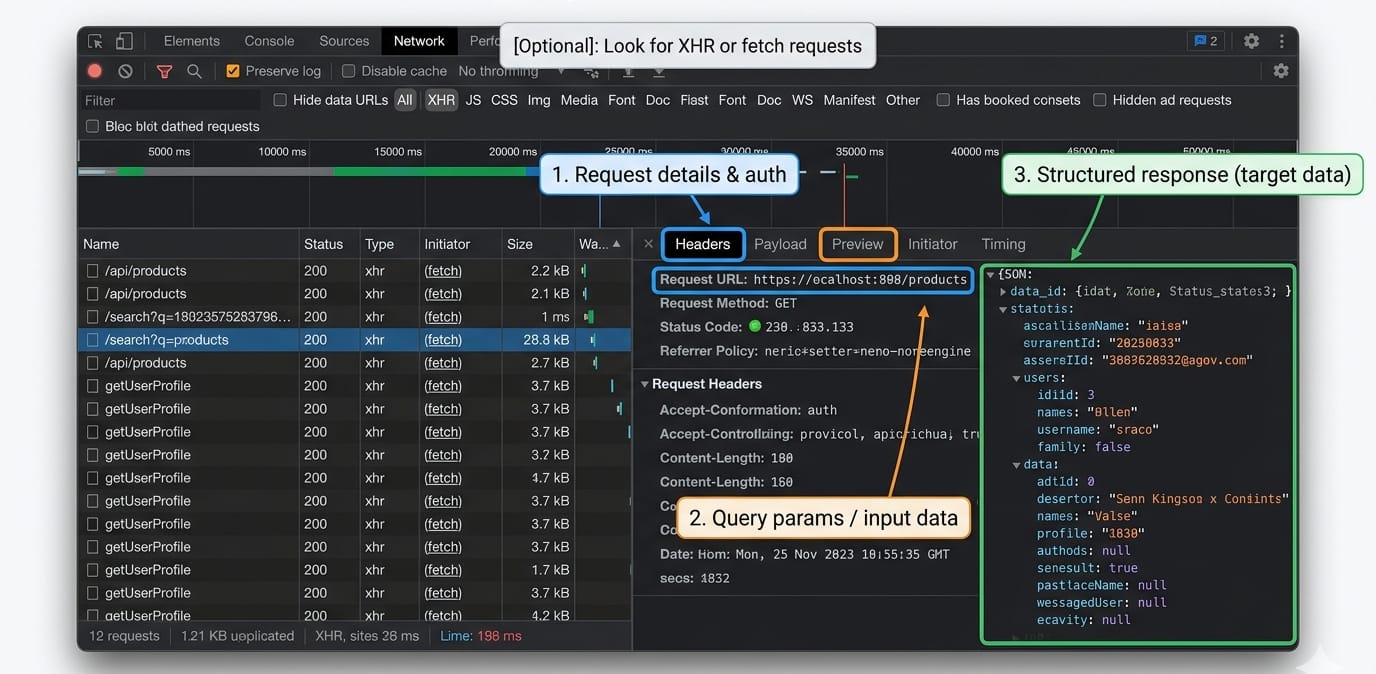
Minimal replay example
Once you find the hidden API, replay it using httpx or requests.
import httpx# Replay the hidden API request captured in DevToolsheaders = {"User-Agent": "Mozilla/5.0", "Accept": "application/json"}response = httpx.get("https://example.com/api/v1/data?page=1", headers=headers)if response.status_code == 200: data = response.json() print(f"Extracted {len(data['results'])} items without a browser.")For readers needing to inspect or intercept network responses dynamically within a real browser session, reference the official Playwright Python network docs covering page.expect_response().
How to handle AJAX requests, infinite scroll, and SPA rendering
Treat AJAX, infinite scroll, and SPA hydration as data-flow patterns, not visual obstacles. Replicate the network request instead of simulating a mouse scroll.
AJAX requests scraping
How do you handle AJAX in web scraping? Inspect the network calls, isolate the specific API endpoint returning the data, and replay that call outside the browser. If you must use a browser, wait for the specific XHR response to complete, rather than using arbitrary time delays.
Infinite scroll in Python
Infinite scroll is just pagination wearing a UI costume. First, look for the underlying cursor-based pagination in the DevTools Network tab. Only simulate physical scrolling if no accessible request layer exists. If you must scroll, define a strict programmatic stop condition to prevent infinite loops.
SPA hydration and DOM rendering
Frameworks like React, Vue, and Next.js rely on hydration blobs. "View Source" often shows an empty <body>, but DevTools reveals the truth. Look for tags like <script id="__NEXT_DATA__" type="application/json"> and parse the JSON directly via Python's built-in json library.
Login-gated sessions
Handle authenticated state by using a browser for the initial login, then handing the session off to an HTTP client for extraction. If managing authenticated browser state at scale becomes a bottleneck, Olostep Context allows users to pass custom cookies directly to the API, enabling auth and stored data reuse (currently enabled for selected users in beta).
Playwright vs Selenium for Python scraping
For new Python web scraping projects, recommend Playwright first. Keep Selenium for legacy fit, Grid-heavy environments, or existing infrastructure investments.
Playwright natively supports asynchronous operations and isolated browser contexts. Its locator-driven interactions include built-in auto-waiting before actionability checks, meaning you spend less code handling race conditions.
Selenium fits best when integrating with an existing Selenium Grid, relying on legacy team skills, or working within strict enterprise inertia. Do not teach manual driver downloading as a default path; Selenium Manager now ships natively, automating driver updates automatically.
Waiting strategies that do not rot
Fixed time.sleep() statements are a fallback, not a strategy. Playwright handles synchronization via native auto-waiting. Selenium requires explicit waits for specific element conditions. Never mix implicit and explicit waits in Selenium, as the official documentation strictly warns against the unpredictable timeouts this causes.
# Playwright: Waiting for a specific network response, not a timerasync with page.expect_response("**/api/data") as response_info: await page.locator("button#load-more").click()response = await response_info.valueprint(await response.json())Anti-bot handling without myths
If you only rotate IP addresses and user-agents, you are solving the 2022 version of this problem. Modern anti-bot systems evaluate trust across TLS fingerprints, JavaScript environments, and behavioral profiling.
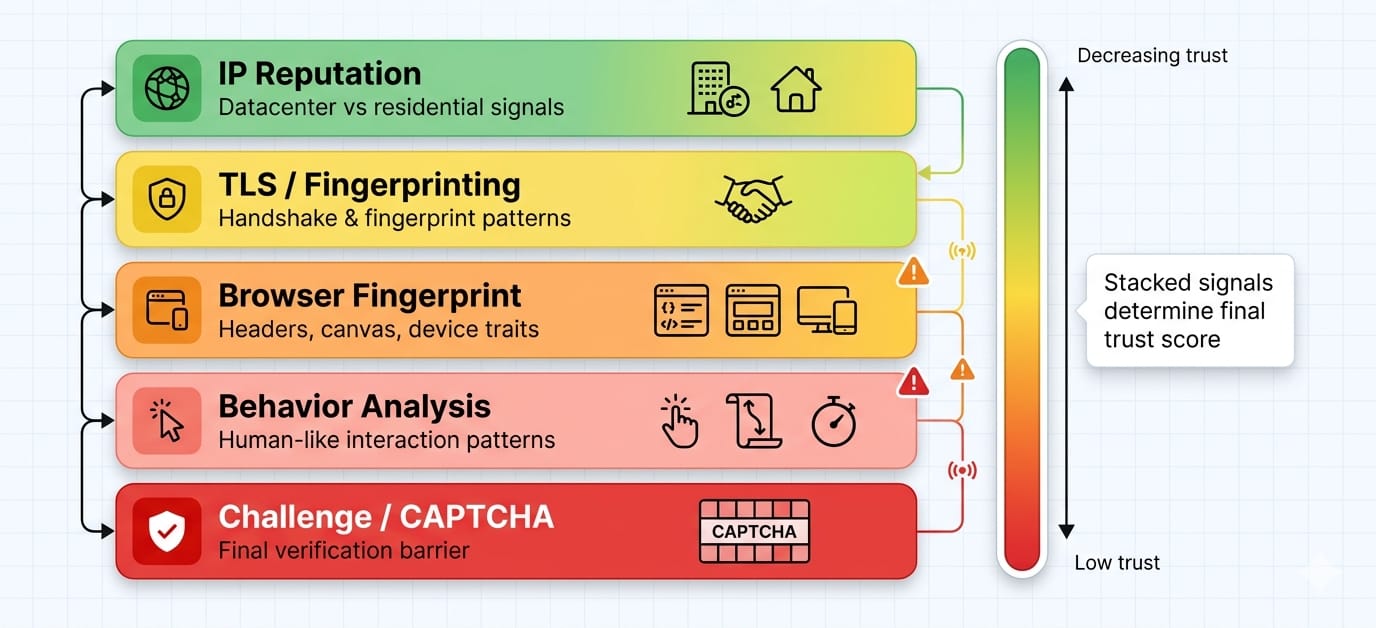
Anti-bot defenses are escalating aggressively. Working scripts get blocked because anti-bot systems evaluate trust across five layers.
- TLS fingerprinting: Your headers might look human, but your TLS handshake (JA3/JA4) exposes your Python script.
- IP reputation: Datacenter IPs degrade trust instantly compared to residential or mobile routing.
- JavaScript environment checks: Systems scan for
navigator.webdriver, missing browser APIs, or inconsistent canvas fingerprints. - Behavior profiling: Defenses measure pacing, navigation paths, and unnaturally perfect interaction loops.
- Challenge systems: Turnstile or CAPTCHA challenges appear when your trust score drops too low.
By the time you see a CAPTCHA challenge, your trust score is already heavily damaged. You must identify which specific layer—IP, TLS, or JS fingerprinting—is failing.
Brief operational risk note: Web scraping carries operational and legal risks. In late 2025, Reddit filed a lawsuit against Perplexity, SerpApi, and Oxylabs over alleged large-scale scraping of its platform data.
In December 2025, Google sued SerpApi over alleged circumvention of SearchGuard protections. Always verify current case statuses, respect target terms of service, and consult legal counsel.
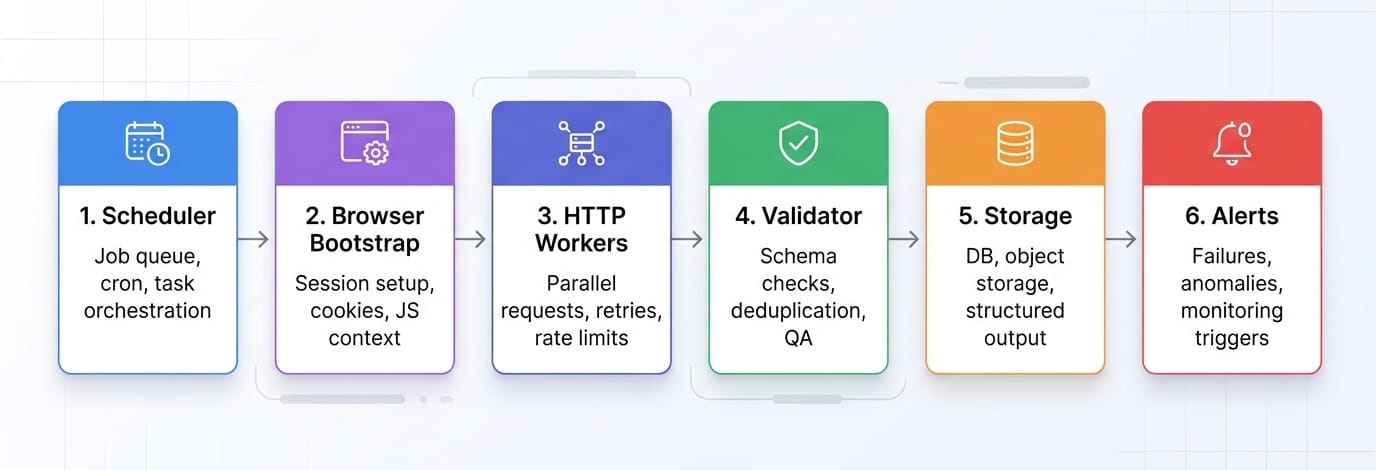
The production pattern most tutorials skip: browser bootstrap, HTTP extraction
Use the browser to unlock the session. Use HTTP to do the real volume.
Do not use a headless browser to click through 500 pages of pagination. Instead, write a script that logs in via Playwright, captures the resulting session cookies and headers, and passes them to httpx. Replay the paginated requests outside the browser.
Browsers are incredibly resource-intensive. HTTP pipelines built with proper retry logic, backoff algorithms, and resource limits outperform browser grids every time. The ~50MB vs ~300-500MB RAM differential per worker dictates whether you can run 10 concurrent extractions or 100 on the same machine.
Validation and monitoring
Getting HTML is not success. Getting correct, repeatable data is success. Implement schema validation to catch null-rate spikes, row-count drift, and duplicate detection. Set up canary URLs to alert your team when layouts change silently.
Use deterministic parsers for recurrent, high-volume extraction where schemas are predictable. Reserve LLM-based extraction for messy one-offs or rapidly evolving, unstructured layouts. Olostep Parsers are designed for recurrent structured extraction. They are highly cost-efficient compared to LLMs for repeatable workloads, return strictly required JSON, and provide self-healing capabilities against DOM changes.
When to use a web scraping API instead of Playwright or Selenium
Stay DIY while you are learning or handling small scope. Switch when browser management, anti-bot routing, and proxy rotation become your full-time job instead of data extraction.
Stay DIY when:
- You are targeting a single site.
- Your request volume remains low.
- Full control of the pipeline matters more than development speed.
- You are still discovering the target’s hidden data layer.
Switch when:
- Targets rely heavily on obfuscated JS rendering.
- You manage multi-site maintenance overhead.
- You spend days reverse-engineering anti-bot systems.
- You are scaling from 100 to 10k+ URLs.
- Structured JSON outputs matter more to your pipeline than raw HTML.
Where Olostep fits
Olostep is the production alternative when your pipeline bottlenecks on rendering, browser session management, retries, and structuring output. Instead of managing Chromium instances, you request data and receive it.
- Scrape endpoint: The
/v1/scrapesendpoint returns HTML, Markdown, text, screenshots, or structured JSON, supporting native browser actions likewait,click,fill_input, andscroll. (Olostep Scrapes Docs) - JS rendering: JavaScript rendering is fully managed and enabled by default. (Olostep JS Rendering)
- Parsers: Apply deterministic parsers for repeatable structured JSON at scale. (Olostep Parsers Docs)
- Batch processing: Handle up to 10k URLs per batch with ~5–8 minute processing times regardless of size. (Olostep Batch Docs)
- Python SDK: Use
AsyncOlostepfor high-performance concurrent workloads, featuring automatic retries for transient errors. (Olostep Python SDK)
Need rendered content without running your own browser fleet? Read the Olostep Scrape docs.
Already have 100 to 10k URLs? Read the Olostep Batch docs.
If your real task is competitor URL discovery rather than page-level extraction, Olostep’s competitor site structure workflow combines sitemaps, robots.txt, and rendered crawl coverage to export deduplicated URL inventories.
60-second decision checklist
- If an official API exists, use it.
- If the page calls XHR/Fetch/GraphQL, replay the request.
- If the data is embedded in script tags, parse the JSON directly.
- If plain HTTP fails but the endpoint still exists, escalate to browser-like HTTP.
- If login or JS token generation is required, perform a browser bootstrap then switch to HTTP.
- If browser operations dominate your engineering time, use a managed API.
If you want to test this logic fast, try one target URL with your chosen method before building the full pipeline.
FAQ
What is the best Python library for web scraping dynamic pages?
The best library depends on the extraction layer. Use Playwright for modern browser automation, requests or httpx (or curl_cffi for TLS impersonation) for accessing hidden APIs, BeautifulSoup for parsing acquired HTML, and managed APIs like Olostep when scale, maintenance, and anti-bot routing dominate your workflow.
Is Selenium or Playwright better for scraping?
Playwright is the recommended default for new Python scraping projects due to its native auto-waiting, asynchronous architecture, and robust network interception capabilities. Selenium remains highly effective when integrating with existing WebDriver infrastructure or legacy Grid deployments.