

You need to scrape a website, but the data is locked behind JavaScript, user logins, or infinite scrolling. Standard HTTP libraries fail here because they only download static code. You need a real browser.
Selenium web scraping solves this by automating a live browser session to render JavaScript, click buttons, and extract hidden data. While it excels at executing complex frontend interactions, running a full browser carries heavy compute overhead.
Last Tested Environment
- Python: 3.12+
- Selenium: 4.18+
- Chrome: 122+
- OS: macOS / Linux
Direct Answer: What is Selenium web scraping?
Selenium web scraping uses the Selenium WebDriver and Python to automate a headless web browser, load JavaScript-heavy websites, and extract the fully rendered HTML. It forces the browser to execute the site's frontend logic before pulling the data, making it ideal for scraping dynamic content, handling logins, and interacting with the DOM.
When to use Selenium for web scraping (and when not to)
Stop treating browser automation as the default extraction method. Running headless browsers requires RAM, CPU, and constant maintenance. Use Selenium only when the page actively resists standard HTTP requests by requiring JavaScript rendering, stateful interactions, login flows, or pagination clicks.
Do not use Selenium for static HTML, clean REST APIs, or bulk high-throughput extraction pipelines. Direct HTTP extraction is significantly cheaper and faster (performance benchmark).
The Extraction Decision Tree
Your extraction layer depends entirely on the target site's architecture:
- Static page: Use Requests + Beautiful Soup.
- Same data available via XHR/Fetch: Make a direct HTTP request.
- JS-rendered page requiring user interaction: Use Selenium or Playwright.
- High-volume production pipeline: Use a managed browser or scraping API.
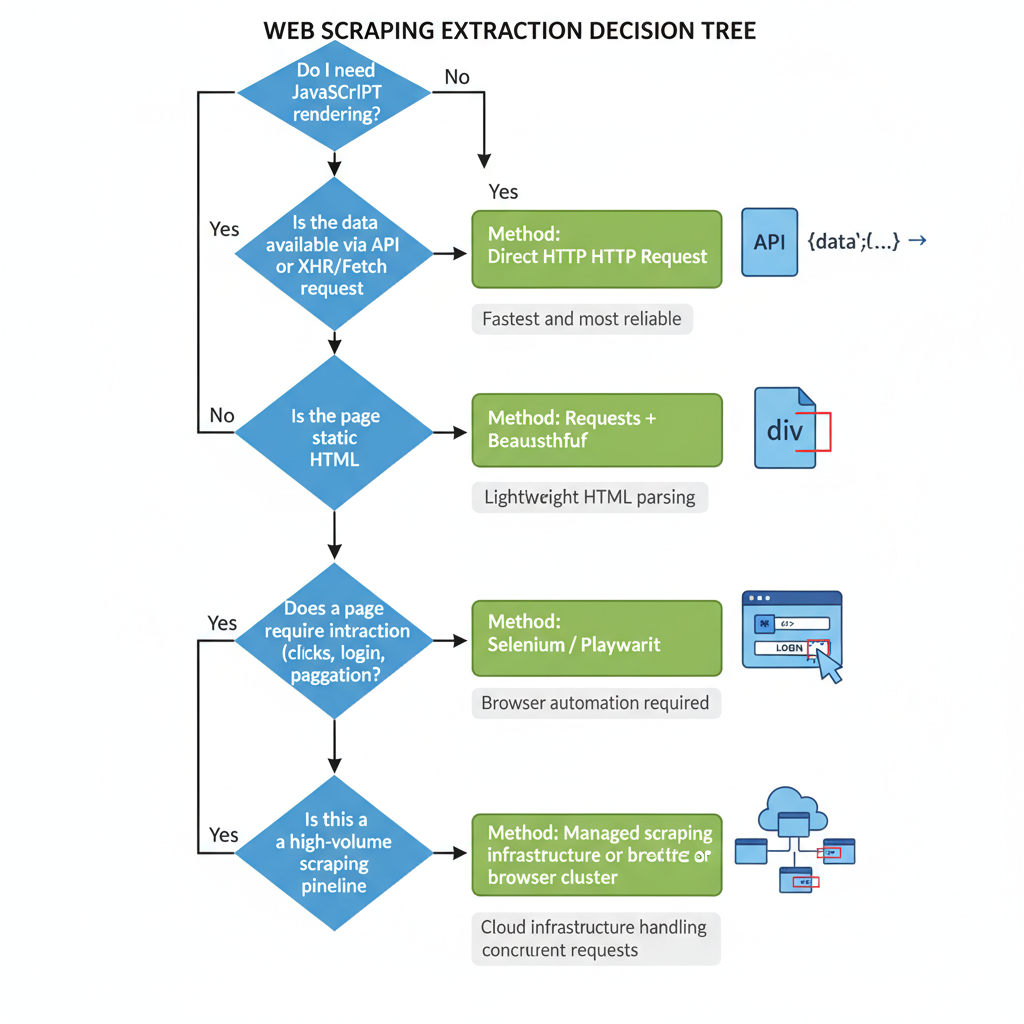
Selenium is a good fit when you need specific browser behavior, not when you only need data. Use it for interaction, not just extraction.
Modern Selenium Python setup (2026-correct)
Most online tutorials teach obsolete setup routines. You no longer need to manually download chromedriver.exe or match it to your browser version.
1. Install Selenium
Install the library using pip:
pip install seleniumModern versions of Selenium include Selenium Manager. When you call webdriver.Chrome(), Selenium Manager automatically detects your installed browser, fetches the correct driver binary, and resolves the path automatically.
2. Configure Chrome for headless scraping
Run headed mode (with the UI visible) while writing and debugging your script. Switch to headless mode (no UI) for automated scraping.
Google recently updated Chrome's headless architecture. Use --headless=new to ensure the browser behaves exactly like a real user's browser, bypassing older bot-detection traps tied to the legacy headless mode.
from selenium import webdriver

options = webdriver.ChromeOptions()
options.add_argument("--headless=new") # Modern headless architecture
options.add_argument("--disable-gpu") # Optional stability for Linux servers
options.add_argument("--window-size=1920,1080") # Prevents responsive mobile layouts
3. Smoke-test the environment
Run this minimal check to ensure Selenium Manager and Chrome communicate successfully.
driver = webdriver.Chrome(options=options)
driver.get("https://example.com")

print(f"Success! Page title is: {driver.title}")
driver.quit()
Rely on Selenium Manager to handle driver binaries automatically. Keep your Chrome arguments minimal to avoid creating unique, highly detectable browser fingerprints.
Selenium python web scraping tutorial: Build your first scraper
We will build a scraper against a dynamic e-commerce template (target URL: https://demo-ecom.com/js-products).
Map the target elements
Before writing code, inspect the target elements in your browser's DevTools. We want to extract product cards injected via JavaScript.
- Title:
h2.product-title(Text) - Price:
span.price-tag(Text) - Link:
a.product-link(hrefattribute)
Build the minimal scraper step-by-step
Launch the driver, load the page, and wait for the JavaScript to inject the product cards into the Document Object Model (DOM).
import json
from selenium import webdriver
from selenium.webdriver.common.by import By
from selenium.webdriver.support.ui import WebDriverWait
from selenium.webdriver.support import expected_conditions as EC

# 1. Launch browser
options = webdriver.ChromeOptions()
options.add_argument("--headless=new")
driver = webdriver.Chrome(options=options)

driver.get("https://demo-ecom.com/js-products")

# 2. Wait for dynamic content to render
wait = WebDriverWait(driver, 10)
cards = wait.until(EC.presence_of_all_elements_located((By.CSS_SELECTOR, ".product-card")))

extracted_data = []

# 3. Extract fields from each card
for card in cards:
    title = card.find_element(By.CSS_SELECTOR, "h2.product-title").text
    price = card.find_element(By.CSS_SELECTOR, "span.price-tag").text
    link = card.find_element(By.CSS_SELECTOR, "a.product-link").get_attribute("href")

    extracted_data.append({
        "title": title,
        "price": price,
        "link": link
    })

driver.quit()

# 4. Export to JSON
with open("products.json", "w", encoding="utf-8") as f:
    json.dump(extracted_data, f, indent=2, ensure_ascii=False)
Why explicit waits beat fixed sleeps
Never use time.sleep(5). It forces your script to wait exactly 5 seconds even if the page loads in 500 milliseconds, destroying your scraper's throughput. Explicit waits (WebDriverWait) pause execution only until a specific condition is met, then instantly proceed.
If you can load a page, explicitly wait for a state change, and extract one element reliably, you have mastered the core Selenium scraping loop.
How to scrape dynamic websites with Selenium
Dynamic websites require interaction to reveal full datasets. Each interaction introduces a potential race condition between your script and the browser's rendering engine.
Click-driven content and modal gates
To scrape hidden tabs or trigger a "Load More" button, locate the element safely, click it, and wait for the DOM to update.
load_more_btn = wait.until(EC.element_to_be_clickable((By.ID, "load-more")))
load_more_btn.click()

# Wait for the item count to increase
wait.until(lambda d: len(d.find_elements(By.CSS_SELECTOR, ".product-card")) > len(cards))
Always wait for state changes, not time. Use content count, text visibility, or attribute mutations as your trigger condition.
Infinite scroll without brittle loops
Scrolling down a page triggers new XHR network requests. Scroll incrementally and stop when the document height plateaus.
import time

last_height = driver.execute_script("return document.body.scrollHeight")

while True:
    driver.execute_script("window.scrollTo(0, document.body.scrollHeight);")
    time.sleep(1.5) # Short pause to allow network request firing

    new_height = driver.execute_script("return document.body.scrollHeight")
    if new_height == last_height:
        break # Reached the end of the page
    last_height = new_height
Handling stale element references
A StaleElementReferenceException occurs when a script tries to interact with an element that JavaScript frameworks (like React or Vue) have completely rebuilt in the Virtual DOM. Catch the error, re-query the element using your selector, and try the interaction again.
Dynamic pages fail less when your wait conditions track actual page state changes rather than arbitrary countdown timers.
The Hybrid Pattern: Selenium plus Beautiful Soup
Live DOM extraction using Selenium locators is slow. Every .find_element() call communicates back and forth with the browser via the WebDriver protocol.
If you only need Selenium to bypass a JavaScript loading screen, stop using it for parsing. Let the browser render the page, then pass the static HTML to Beautiful Soup.
from bs4 import BeautifulSoup

# 1. Render with Selenium
driver.get("https://demo-ecom.com/js-products")
wait.until(EC.presence_of_element_located((By.CSS_SELECTOR, ".product-card")))

# 2. Extract raw HTML and close the browser immediately
html = driver.page_source
driver.quit()

# 3. Parse locally with Beautiful Soup
soup = BeautifulSoup(html, "html.parser")
for card in soup.select(".product-card"):
    print(card.select_one("h2.product-title").text)
This pattern eliminates stale element exceptions and speeds up your parsing logic. However, it carries the exact same RAM footprint because you still launch headless Chrome to acquire the source code.
Bypassing the DOM: Intercept the real data source
This is the most critical concept in modern web scraping. Browsers render UI for humans. Scraping the DOM forces your machine to download images, execute CSS, and render layouts just to pull text from an <h2> tag.
Almost all dynamic content is populated by a backend JSON API.
- Open Chrome DevTools.
- Navigate to the Network panel.
- Filter by Fetch/XHR and refresh the page.
- Look for endpoints returning raw JSON data containing the information you need.
Modern Selenium environments utilizing WebDriver BiDi (Bidirectional) can natively intercept these underlying network payloads without ever parsing the DOM. If the endpoint is open, you can bypass Selenium entirely and use the requests library to fetch the JSON directly.
The best Selenium scraper uses Selenium only where the browser is strictly required. Always check the Network tab first.
Production hardening for Selenium WebDriver scraping
Tutorial scripts break the moment they hit the real world. Real-world scrapers demand aggressive fault tolerance.
1. Build resilient selectors
Never rely on autogenerated class names (e.g., class="css-1xhj18k"). Scope selectors to stable parent containers. Follow this fallback hierarchy:
- Data attributes (
[data-test="price"]) - Semantic attributes (
name="description") - Stable CSS classes (
.product-card) - XPath (Use strictly as a last resort for complex DOM traversal)
2. Add retry logic
Network requests drop. Proxies time out. Wrap interactions in deliberate retry loops. Catch TimeoutException for slow loads and NoSuchElementException for missing data.
3. Manage browser resources
Headless browsers leak memory over time. Never run a single browser instance for 10,000 URLs. Implement browser recycling: kill the driver and launch a fresh session every 100 pages to clear the cache and free up RAM.
4. Implement observability
When a headless script fails on a remote server, you need visual proof. Capture screenshots (driver.save_screenshot("error.png")) or save the HTML dump on exception blocks to debug failures after the fact.
The anti-bot reality check
No amount of code optimization matters if the target site blocks your IP.
Selenium handles basic dynamic sites and internal portals seamlessly. However, advanced bot protection systems (like Cloudflare or DataDome) look directly at the browser execution environment. The default Selenium WebDriver actively leaks a webdriver: true variable in the browser's JavaScript environment.
While open-source stealth patches attempt to hide these fingerprints, it is a permanent arms race. Stealth tools degrade over time.
Do not try to build CAPTCHA-solving OCR scripts. If a site throws a CAPTCHA, your IP or browser fingerprint is already burned. Route your traffic through residential proxy rotation and respect rate limits aggressively.
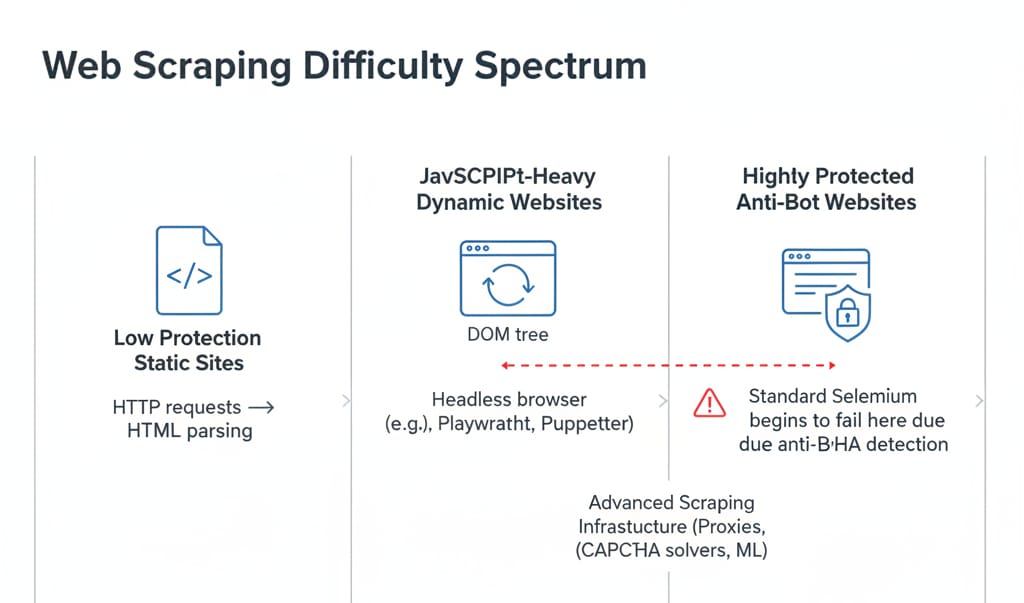
The real cost of Selenium at scale
The library is open-source. Running it is not.
A single headless Chrome instance consumes significant RAM (browser engine benchmark), plus heavy CPU cycles during JavaScript execution. Local parallelism hits a severe hardware ceiling quickly.
Furthermore, scraping economics rarely account for engineer salaries. Maintenance is dominated by selector churn, forced browser binary updates, proxy rotation management, and debugging.
- One-off script: Local Selenium is perfect.
- Small recurring workflow: Selenium on a cheap VPS works fine.
- Production data pipeline: Managed infrastructure is mathematically cheaper than internal DevOps (build-vs-buy cost comparison).
When to transition to Managed Infrastructure (Olostep)
If your goal is reliable, structured web data at scale—not babysitting driver updates and proxy bans—evaluate an infrastructure platform like Olostep.
Olostep manages the entire headless browser lifecycle, handles global proxy rotation, automatically bypasses anti-bot systems, and uses deterministic parsers to deliver clean JSON. It replaces complex, resource-heavy orchestration scripts with a single API call. When local Selenium prototypes hit their operational limits, Olostep is the logical next step for production batch jobs.
Selenium is free to install, but expensive to scale. Choose the tool for the extraction layer you actually need, not the tool you learned first.
FAQ
What is Selenium in web scraping?
Selenium is an open-source browser automation framework. In web scraping, it controls headless browsers, renders JavaScript-heavy dynamic web pages, and interacts with elements like buttons and forms before extracting the underlying data.
Can Selenium be used for web scraping?
Yes. It is highly effective for extracting data from JavaScript-rendered single-page applications (SPAs). However, it consumes significantly more compute resources than standard HTTP requests, making it costly for large-scale batch operations.
How do I scrape a website using Selenium Python?
Install the library via pip, initialize webdriver.Chrome(), use .get(url) to load the page, apply WebDriverWait for dynamic content to render, and extract text using CSS selectors. Finally, export the parsed data to JSON or CSV.
Is Selenium good for scraping dynamic websites?
Yes. Because Selenium runs a real Chromium engine, it natively executes React, Vue, or Angular applications. It excels at rendering and interaction, though it remains slower for high-throughput extraction compared to API interception.
Selenium vs Beautiful Soup for web scraping: Which is better?
Beautiful Soup is strictly an HTML parser; it cannot render JavaScript or execute clicks. Selenium controls a browser to render JavaScript. They work best together: Selenium renders the dynamic DOM, and Beautiful Soup parses the resulting static HTML.
Do I still need ChromeDriver for Selenium Python?
No. Modern versions of Selenium (v4.6+) include Selenium Manager. This utility automatically detects your local Chrome installation, downloads the correct matching driver binary, and configures the system paths in the background.