

You can perform web scraping with Java by combining the native java.net.http.HttpClient for fetching raw HTML, Jsoup for parsing the DOM, and Playwright for Java for rendering dynamic JavaScript. For maximum efficiency and scalability, always prioritize direct hidden API extraction before falling back to HTML DOM parsing or memory-heavy headless browsers.
The most expensive mistake developers make in web scraping with Java is launching a headless browser when a simple HTTP request would suffice. Enterprise data extraction requires a strict hierarchy: API first, HTML second, browser last. Decoupling your fetch layer from your parsing layer ensures your workflows survive frontend redesigns and scale efficiently.
This guide covers how to extract structured data, handle dynamic client-side rendering, and eliminate parser maintenance.
Start with the lowest-cost extraction layer (HttpClient). Escalate to headless browsers (Playwright) only when client-side JavaScript execution is unavoidable.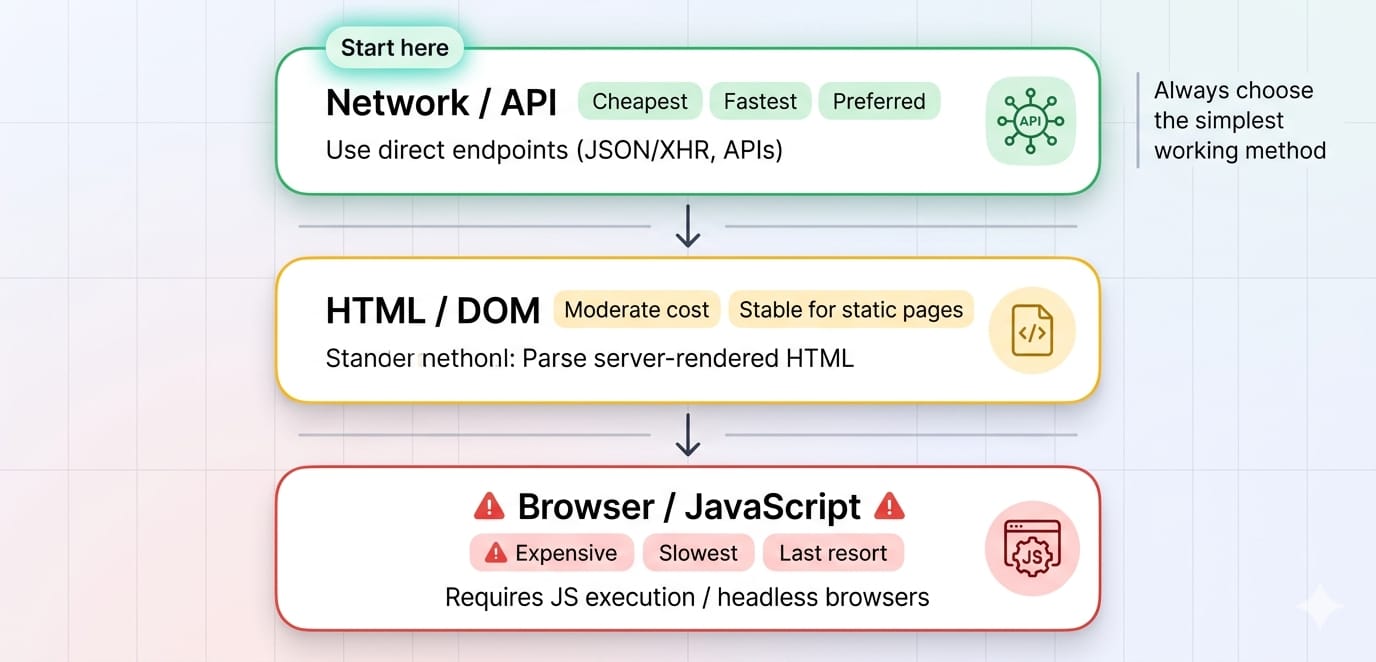
Java Web Scraping Libraries: What to Use and When
Keep your technology stack lean. You need one native fetch layer, one DOM parser, and one browser engine.
java.net.http.HttpClient (The Fetch Layer)
The default HTTP client in JDK 11+ is fully equipped for Java scraping. It natively supports synchronous and asynchronous dispatch, HTTP/2, and connection pooling. Use this to fetch static HTML or raw JSON payloads directly.
Jsoup (The Parser)
Jsoup is the industry standard for HTML parsing in Java. It handles malformed HTML flawlessly and allows you to extract data using familiar CSS or XPath selectors. It is strictly a parser, meaning it cannot execute JavaScript.
Playwright for Java (The Browser Layer)
Playwright is the modern standard for rendering single-page applications (SPAs). It excels at auto-waiting for DOM elements, intercepting network requests, and managing isolated browser contexts without the boilerplate of legacy tools.
Selenium vs Jsoup Java
If you are comparing selenium vs jsoup java, you are comparing a browser to a parser. Jsoup extracts data from static HTML instantly. Selenium boots a full web browser to execute JavaScript and simulate user behavior. Always use Jsoup for static content. Use Playwright (the modern alternative to Selenium) only when you must render dynamic sites.
How to Scrape a Website Using Java (Static Content)
If the data is embedded directly in the server-rendered HTML, HttpClient and Jsoup are all you need.
Initialize HttpClient once and reuse it across requests to benefit from connection pooling. Creating a new client per request exhausts sockets and degrades performance.1. Fetch the HTML
Send an HTTP GET request to your target URL.
// Initialize globally to reuse the connection pool
private static final HttpClient client = HttpClient.newBuilder()
    .connectTimeout(Duration.ofSeconds(10))
    .followRedirects(HttpClient.Redirect.NORMAL)
    .build();

public String fetchHtml(String targetUrl) throws Exception {
    HttpRequest request = HttpRequest.newBuilder()
        .uri(URI.create(targetUrl))
        .header("User-Agent", "Mozilla/5.0 (Compatible; JavaScraper/1.0)")
        .GET()
        .build();

    HttpResponse<String> response = client.send(request, HttpResponse.BodyHandlers.ofString());
    return response.body();
}
2. Parse the DOM with Jsoup
Pass the raw HTML string into Jsoup and use CSS selectors to extract your target fields. Prefer CSS selectors (article.product, h2.title) over complex XPath queries for better resilience against minor site redesigns.
public void parseProduct(String html, String baseUri) {
    Document doc = Jsoup.parse(html, baseUri);
    Elements products = doc.select("article.product-card");

    for (Element product : products) {
        String title = product.selectFirst("h2.title").text();
        // Use .attr() to pull data from hidden attributes
        String price = product.selectFirst("span[data-price]").attr("data-price");
        // Use .absUrl() to convert relative paths to absolute URLs
        String link = product.selectFirst("a").absUrl("href");

        System.out.println(new ProductRecord(title, price, link));
    }
}
3. Model Structured Data Extraction
Always persist your scraped data into a strict schema. Java record classes are perfect for ensuring immutable, predictable outputs.
public record ProductRecord(
    String title,
    String price,
    String sourceUrl
) {
    public ProductRecord {
        Objects.requireNonNull(title, "Title missing");
        Objects.requireNonNull(sourceUrl, "URL missing");
    }
}
How to Scrape Dynamic Websites in Java
Most dynamic scraping challenges are actually API discovery problems. Check the network traffic before you write browser automation code.
Step 1: Inspect Hidden APIs (The Fast Way)
When a single-page application loads, it requests structured JSON data from a backend API before rendering the HTML.
- Open Chrome DevTools.
- Navigate to the Network tab and filter by Fetch/XHR.
- Trigger the page action (e.g., click "Load More").
- Inspect the JSON response payload.
If the data is in the JSON response, bypass HTML parsing entirely. Replicate the request headers in your Java HttpClient and parse the JSON directly using Jackson or Gson.
Step 2: Use Playwright for Java (The Fallback Way)
If the site requires cryptographic tokens, complex cookie negotiation, or Canvas rendering, boot a Playwright instance to scrape the dynamic website.
try (Playwright playwright = Playwright.create()) {
    Browser browser = playwright.chromium().launch();
    Page page = browser.newPage();

    // Navigate and auto-wait for network idle state
    page.navigate("https://example.com/dynamic-page",
        new Page.NavigateOptions().setWaitUntil(WaitUntilState.NETWORKIDLE));

    // Wait for the exact element to render
    page.waitForSelector(".data-loaded");

    // Extract the rendered string
    String content = page.locator(".data-loaded").textContent();
    System.out.println(content);
}
Scaling Your Java Crawler
Building a scraper is straightforward. Keeping it alive at scale is difficult. Survey data shows why: in Apify's 2025 survey, 68% of developers named blocking issues such as IP bans and CAPTCHAs as their biggest scraping obstacle.
Separately, a UNECE survey found that about 75% of national statistical offices using web scraping had already dealt with website changes such as structural or XPath changes, which is why production pipelines need both anti-blocking controls and selector maintenance.
Leverage Virtual Threads for Concurrency
Java 21 introduced virtual threads, making it possible to execute thousands of concurrent HTTP requests without exhausting OS memory. Because network calls are I/O-bound (blocking while waiting for server responses), virtual threads offer massive throughput improvements for Java scraping tools.
// Execute thousands of concurrent scraping tasks efficiently
try (var executor = Executors.newVirtualThreadPerTaskExecutor()) {
    List<String> urls = getTargetUrls();
    for (String url : urls) {
        executor.submit(() -> fetchAndParse(url));
    }
}
Add Reliability Primitives
A naked HttpClient request will crash your pipeline during network turbulence. Always wrap your fetches in:
- Timeouts: Set strict connect and read timeouts (10s max).
- Exponential Backoff: Retry failed requests with randomized jitter to avoid DDOSing the target.
- Rate Limiting: Throttle requests dynamically per domain.
When to Stop Maintaining Custom Scrapers
Custom java scraping automation hits a ceiling when your engineering team spends more time rotating proxies, bypassing CAPTCHAs, and fixing broken CSS selectors than actually utilizing the extracted data.
If you are managing complex Playwright clusters and fighting persistent blocks, transition your fetch layer to a purpose-built Web Data API like Olostep.
Integrating Olostep with Java
Olostep acts as a drop-in replacement for your scraping infrastructure. It handles proxy rotation, JavaScript rendering, and anti-bot bypass automatically. You simply make a standard HttpClient POST request, and Olostep returns the structured data, raw HTML, or markdown.
HttpRequest request = HttpRequest.newBuilder()
    .uri(URI.create("https://api.olostep.com/v1/scrapes"))
    .header("Authorization", "Bearer " + System.getenv("OLOSTEP_API_KEY"))
    .header("Content-Type", "application/json")
    .POST(HttpRequest.BodyPublishers.ofString("""
        {
            "url": "https://example.com/target",
            "wait_for_selector": ".data-ready",
            "format": "json"
        }
        """))
    .build();

HttpResponse<String> response = client.send(request, HttpResponse.BodyHandlers.ofString());
// Returns clean, unblocked data ready for processing
For large-scale discovery, Olostep's /maps and /crawls endpoints instantly map out entire site architectures without requiring custom traversal logic.
Frequently Asked Questions
Can Java be used for web scraping?
Yes. Java is highly effective for web scraping. By utilizing HttpClient for network requests, Jsoup for DOM extraction, and Playwright for JavaScript rendering, Java developers can build enterprise-grade data extraction pipelines.
What is Jsoup used for?
Jsoup is a Java library used to parse, traverse, and manipulate HTML. It allows developers to extract specific data from web pages using intuitive CSS and XPath selectors. It cannot execute JavaScript.
What libraries are used for web scraping in Java?
The most reliable Java web scraping libraries are the native JDK java.net.http.HttpClient (for making network requests), Jsoup (for parsing static HTML), and Playwright for Java (for browser automation and dynamic content).
Final Thoughts
Mastering web scraping with Java is about constraint. Fetch JSON APIs when possible, parse static HTML with Jsoup when necessary, and boot Playwright only as a last resort.
Once your infrastructure demands exceed your engineering bandwidth, offload the proxy management and browser rendering to an API. Test your hardest-to-scrape URL with the Olostep Platform today to instantly bypass blocks and eliminate manual scraper maintenance.