

Can you build effective data extraction pipelines using Ruby? Yes. Web scraping with Ruby thrives when data extraction integrates directly into an existing Rails application, Sidekiq background worker, or internal automation service.
If you already operate a Ruby ecosystem, you do not need to switch to Python or Node.js for reliable scraping. You just need the right tools.
How to Scrape a Website Using Ruby?
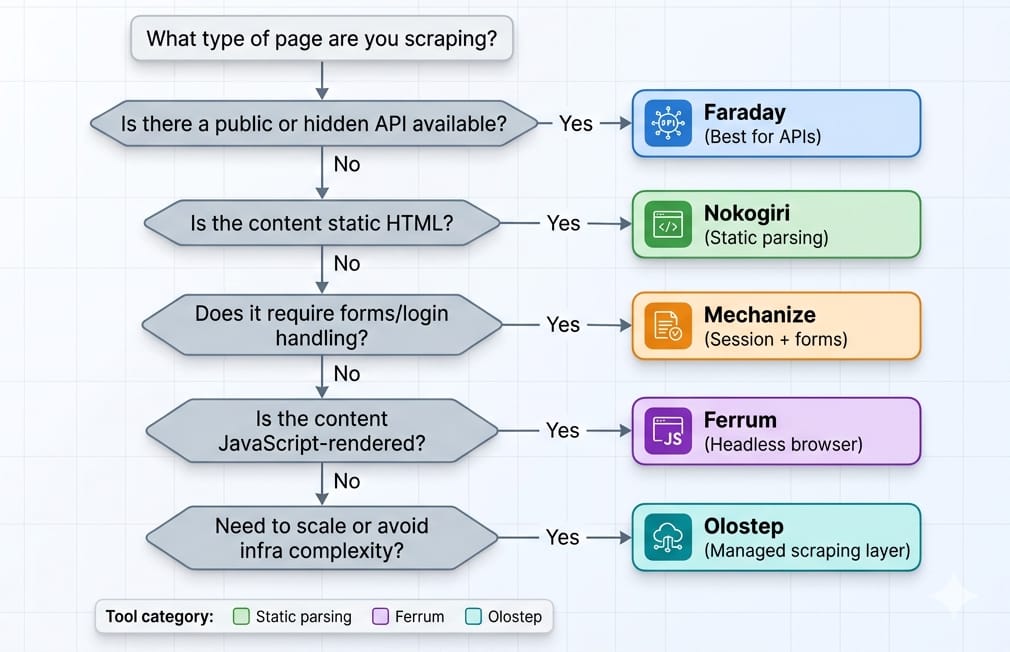
To perform web scraping with Ruby, analyze the target page's architecture first. For static HTML sites or APIs, use Faraday for HTTP requests and Nokogiri to parse the DOM. For logins and form submissions, use Mechanize. If the target page requires JavaScript rendering, drive a headless Chromium browser using Ferrum.
- JSON/XHR available: Intercept the API. Skip DOM parsing entirely.
- Static HTML: Faraday + Nokogiri.
- Forms/login/session state: Mechanize.
- JS-rendered pages: Ferrum.
- Scaling recurring extraction: Move up to an API layer like Olostep.
Can You Scrape Websites with Ruby?
Ruby is a powerful choice when data extraction supports an existing app, but it struggles as a standalone high-scale distributed crawler.
When Ruby is a Good Fit
- Internal tools and recurring automations.
- Rails-backed workflows needing unified data pipelines.
- Moderate-volume extraction.
- Teams maintaining a single-language stack.
When Ruby is the Wrong Tool
- Massive distributed crawlers handling millions of pages daily.
- Heavy stealth or anti-bot arms races.
- Environments already standardized on Python (Scrapy) or JS (Playwright).
I find that Ruby works best as an extension of your current infrastructure, rather than trying to compete head-on with Python's dedicated scraping ecosystems.
What Libraries Are Used for Web Scraping in Ruby?
Most extraction friction stems from choosing the wrong library. Open your browser DevTools. Check the Network tab. Always prefer intercepting stable JSON payloads over HTML parsing in Ruby.
If the data is locked inside the DOM, choose from this core stack:
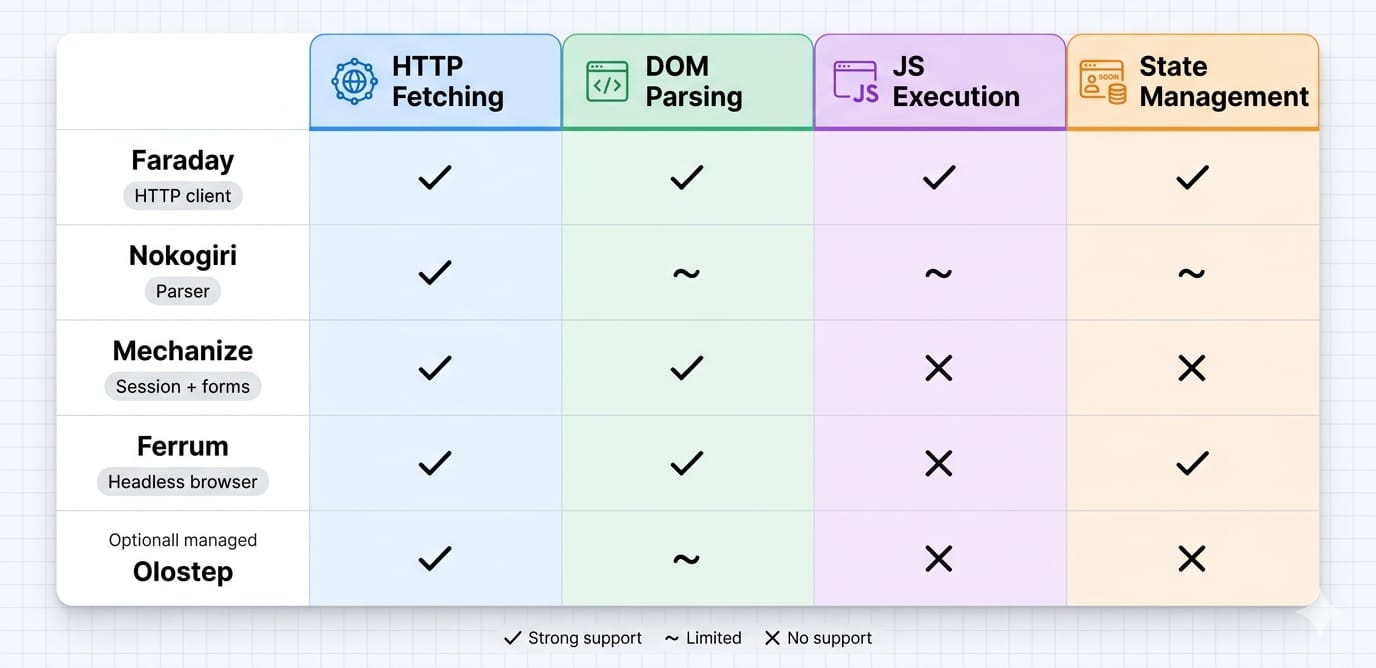
- Faraday: Use for HTTP requests. Faraday excels in maintainable scraping services due to its middleware support for proxies and retries.
- Nokogiri: Use for HTML parsing. It provides robust CSS and XPath capabilities but cannot execute JavaScript.
- Mechanize: Use for stateful navigation. It handles cookies, forms, redirects, and session flows automatically.
- Ferrum: Use for dynamic JS-rendered pages. It drives Chromium via the Chrome DevTools Protocol (CDP) natively.
- Watir: Use only when cross-browser compatibility or existing Selenium infrastructure matters.
Static HTML Scraping with Ruby
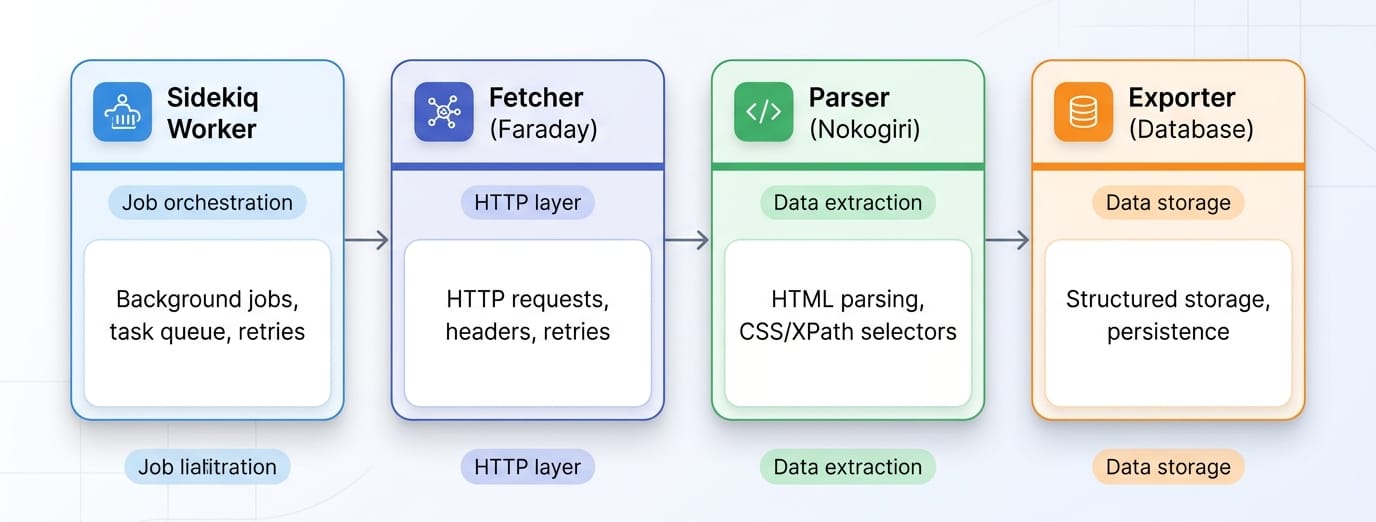
For server-rendered or entirely static pages, the default workflow is linear: HTTP request -> Nokogiri parse -> structured data extraction ruby -> persistence.
1. Minimal Project Setup
Keep your dependencies lean. Create a Gemfile with standard tools.
source "https://rubygems.org"

gem "faraday"
gem "nokogiri"
gem "json"
gem "csv" # Required explicitly in Ruby 3.4+
Run bundle install. Note that Ruby 3.4 moved the csv library out of the default gems, requiring explicit declaration. Avoid outdated open-uri tutorials; always use a real HTTP client for production scrapers.
2. Make the HTTP Request
Default to Faraday. Its clean extensibility supports retries, custom headers, and proxy rotation seamlessly.
require "faraday"

response = Faraday.get("https://example.com/products")
html = response.body
3. Parse HTML with Nokogiri
What is Nokogiri used for? Nokogiri is a document parser. It converts raw HTML or XML strings into a searchable node tree. It does not fetch pages or render JavaScript.
require "nokogiri"

doc = Nokogiri::HTML(html)
titles = doc.css(".product-card .title").map { |node| node.text.strip }
Use CSS selectors for most targeting. Switch to XPath when traversing upward or filtering by specific text content nodes.
4. Extract Structured Data Safely
Extracting structured data requires building predictable objects. Isolate specific nodes using at_css. Normalize text and safely extract attributes like absolute URLs. Keep parser logic strictly isolated from your storage logic.
require "json"

products = doc.css(".product-card").map do |card|
  {
    title: card.at_css(".title")&.text&.strip,
    price: card.at_css(".price")&.text&.strip,
    url:   card.at_css("a")&.[]("href")
  }
end

File.write("products.json", JSON.pretty_generate(products))
Expert Tip: If CSS-selector performance becomes your primary bottleneck on massive documents, test Nokolexbor. It acts as a drop-in replacement claiming up to 4.7x faster HTML parsing for specific workloads.
Mechanize vs Nokogiri in Ruby: Handling Sessions
Nokogiri parses documents. Mechanize navigates websites.
Mechanize solves session-aware scraping. Reach for it when you encounter login flows, multi-step navigation, or CSRF-protected form submissions on server-rendered pages. It automatically stores cookies, follows redirects, and tracks history seamlessly.
Mechanize fails against Single Page Applications (SPAs) or client-side rendering because it lacks a JavaScript engine. If the target site only requires cookies and basic form submission, use Mechanize before absorbing the massive overhead of a headless browser.
Scraping Dynamic Websites in Ruby
Use a headless browser ruby integration only when the HTTP response lacks the necessary data payload.
Drive Chromium with Ferrum
When targeting React, Vue, or Angular sites, you need post-render DOM content. Use Ferrum. It is a Ruby-native, CDP-based library that requires no bulky Selenium or ChromeDriver dependencies.
Ferrum executes clicks, waits, and scrolls.
- Wait smartly: Always wait for a specific selector to appear in the DOM rather than using hardcoded sleep timers.
- Block heavy assets: Block unnecessary network requests (images, fonts, media) to optimize rendering speed.
- Mask your footprint: Set headers and user agents intentionally to minimize bot detection.
The True Cost of Browser Automation
In my experience, browser automation consumes massive CPU and RAM overhead. It severely limits throughput and breaks frequently when frontends update. Debugging headless browser state is significantly harder than inspecting a Faraday HTTP response.
If babysitting the browser session becomes the entire focus of your project, reevaluate your architecture.
From Script to Service: Production Ruby Scraping Workflow
Treat your ruby crawler like a resilient ingestion service.
Key Action Items for Production:
- Structure Cleanly: Organize directories by responsibility (
fetcher/,parser/,models/,exporters/). Do not write single-file scripts. - Add Resilience: Implement timeouts, rate limiting, and retries with exponential backoff.
- Isolate Concerns: Your parser should return Ruby hashes or Data Transfer Objects (DTOs). Exporting to a database or CSV happens in a separate layer.
- Test Against Fixtures: Save raw HTML responses locally. Write unit tests validating your parser outputs against these fixtures before deploying.
- Use Background Jobs: Execute scraping automation tasks inside Sidekiq or Resque workers. Never block a web request cycle with a synchronous scraping job.
When to Replace Manual Ruby Scraping with Olostep
Ruby scraping handles moderate workloads beautifully. However, when request handling, proxy rotation, anti-bot bypasses, and headless rendering dominate your engineering time, manual scripting becomes a liability.
This is where Olostep fits into a Ruby stack.
Eliminate the Headless Browser Bottleneck
Olostep replaces brittle extraction pipelines with a unified API. Instead of maintaining Ferrum scripts and proxy pools, you offload the execution.
- Scrapes: Extract single URLs into HTML, Markdown, or structured JSON (JavaScript rendering handled automatically).
- Parsers: Convert pages directly into structured JSON output for repeatable target sites.
- Batches & Crawls: Process large URL lists and manage subpage traversal without manual recursion logic.
Integrate Olostep with Ruby
Calling Olostep from your Ruby app is a standard REST request.
require "faraday"
require "json"

response = Faraday.post(
  "https://api.olostep.com/v1/scrapes",
  { url: "https://example.com/products", format: "json" }.to_json,
  {
    "Authorization" => "Bearer YOUR_API_KEY",
    "Content-Type" => "application/json"
  }
)

puts JSON.parse(response.body)
Keep custom Ruby scripts for narrow, low-volume targets. Use Olostep when scaling challenges and maintenance costs overshadow the actual business value of the data.
Common Outdated Ruby Scraping Advice to Ignore
Many ranking tutorials teach anti-patterns that break on modern Ruby versions.
- Stop using
open(): Ruby 3.0 removed the ability foropen-urito redefineKernel#open. Prefer a dedicated HTTP client like Faraday. - Stop installing ChromeDriver manually: Modern Selenium (v4.6+) uses Selenium Manager automatically. Better yet, bypass Selenium entirely and use Ferrum for native CDP control.
- Check your CSV imports: Ruby 3.4 removed
csvfrom the default gems. You must includegem "csv"explicitly in your Gemfile to avoid LoadErrors.
Final Decision Guide
Start with the lightest, fastest Ruby stack capable of fulfilling your intent.
- Static HTML: Faraday + Nokogiri.
- Forms & Session State: Mechanize.
- JS-rendered pages: Ferrum.
- Recurring extraction at scale: Olostep.
Evaluate an API layer before building complex browser infrastructure. Offload the extraction execution when maintenance becomes the primary bottleneck, and keep your core application logic securely running in Ruby.